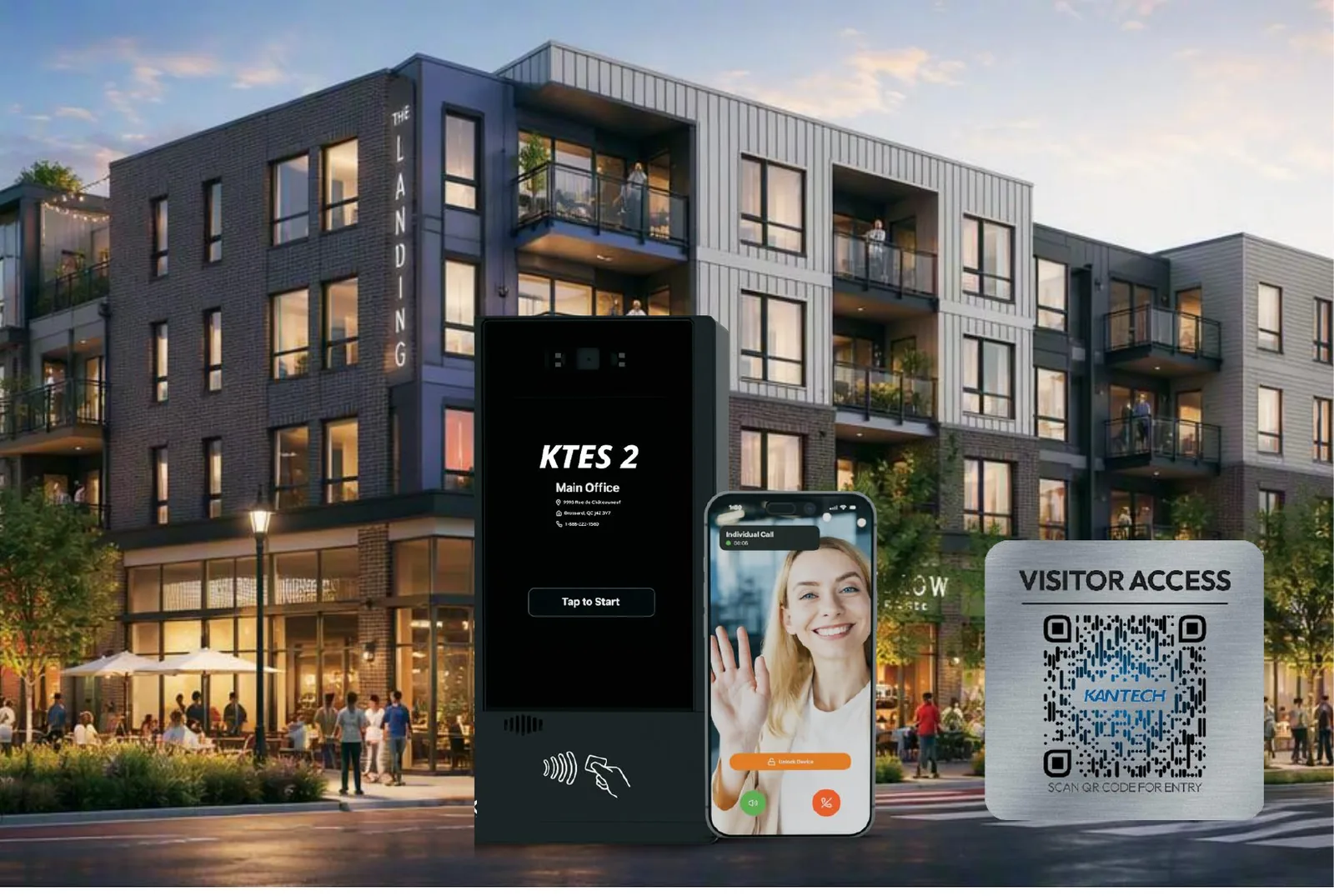
Kantech KTES2: a telephone entry system that lives inside EntraPass
For multi tenant offices, mixed use buildings and campuses, the front door is where access control, intercom and visitor management usually collide. KTES2 puts them in one place.
What it is. Kantech partnered with MyDoorView, a cloud tenant management company, so the tenant side runs in the cloud while EntraPass stays the front end. Property managers manage cardholders and tenants from the same Cardholders menu, so a tenant’s PIN works the same at the intercom and at the access control doors.
How it works. The Kantech controller still controls the door. KTES2 talks to EntraPass and the controller through the cloud connection, and it works with KT-1, KT-2, KT-4 and KT-400 controllers on current firmware. Kantech’s guidance is clear that older KT-200 controllers are due for an upgrade.
The hardware. A 7 inch touchscreen with surface or flush mounting, an optional rain hood and an IK08 impact rating. You can add an ioSmart reader inside the unit, so the entry panel is also a credential reader. It’s PoE and DHCP ready with built in VoIP calling, which keeps setup simple.
Features property managers will notice:
- Tenant app and video calls. Tenants answer a visitor by regular phone call or by video in the tenant app, see who’s there, and unlock the door.
- Guest controls. The property manager creates the tenant; the tenant adds their own guests with a PIN or text. Managers can turn guest creation off for a tenant if needed.
- Visitor access PINs. After a tenant buzzes a visitor in, KTES2 shows a short term PIN the visitor can use on inside ioSmart readers. That guides the visitor to the right place instead of leaving inside doors unlocked.
- Elevator integration without long cable runs. Elevator wiring stays on the Kantech controller, so there’s no cabling from the entry panel up the shaft. Floors can stack for busy delivery times.
- Virtual QR KTES2. A printable, brandable QR code goes on the wall. Visitors scan it and their own phone becomes the entry panel. GPS geofencing limits use to people who are actually on site. It’s useful for secondary entrances, gates and hard to power locations.
- No per tenant fees. Tenants and guests are unlimited in every package. KTES2 runs on a monthly credit subscription based on the package you choose and the number of entry devices (physical or virtual QR), so move ins and move outs don’t change the bill.
This table compares Kantech’s Essential, Professional and Ultimate KTES2 packages so you can see which tier fits a building’s entry panels, visitor flow and video storage needs. Every package includes 180 credits per entry device per year, unlimited tenants and guests, and linked door events; the rows below show only what changes between packages.
| Feature | Essential | Professional | Ultimate |
|---|---|---|---|
| Package credits per year | None | 360 | 720 |
| Entry devices (KTES2 or virtual QR) | Up to 8 | Unlimited | Unlimited |
| Visitor PIN | No | Yes | Yes |
| Elevator linking | No | Yes | Yes |
| Video storage included | No | 14 days | 30 days |
| Extra video storage, up to 365 days | No | Optional, for a fee | Optional, for a fee |
| Delivery agents | No | Optional | Optional |
KTES2 uses a monthly credit subscription, and credits are bought in packs (E-KTES2-Cx). Source: Kantech KTES2 datasheet KT1598-DS-202610-R01. BTI quotes each building.
What to plan for. KTES2 needs a continuous internet connection between the entry panel, EntraPass and the MyDoorView cloud. If the internet drops, card access keeps working on the Kantech controller, but visitor calls and tenant services may pause. Kantech also notes that LDAP created users aren’t compatible with KTES2, EntraPass Corporate 9.21 or later is required, and the subscription has to stay funded for tenant services to keep running. That makes the network design as important as the door hardware. For how this fits mixed-use, multifamily and multi-tenant office buildings, see Kantech for multi-tenant and multifamily buildings.
Kantech ioSmart and mobile credentials: fewer apps, less friction
- New credential formats. ioSmart now comes in cards, key tags and wristbands, all on MIFARE Plus EV2. Wristbands are popular in fitness, residential and campus settings where nobody wants a lanyard.
- Gradual migration from ioProx. Kantech’s 2 button and 4 button transmitters now also carry ioProx, so a site can move from ioProx to ioSmart in stages without replacing every reader in one weekend.
- Tap and go mobile pass (announced). Kantech says it’s rebuilding EntraPass Go Pass so users simply tap their phone on an ioSmart reader, without opening an app. Enrollment starts from an email link and a tap on the reader, which Kantech says works even on air gapped systems. Android uses NFC; iPhone uses Bluetooth that behaves like NFC.
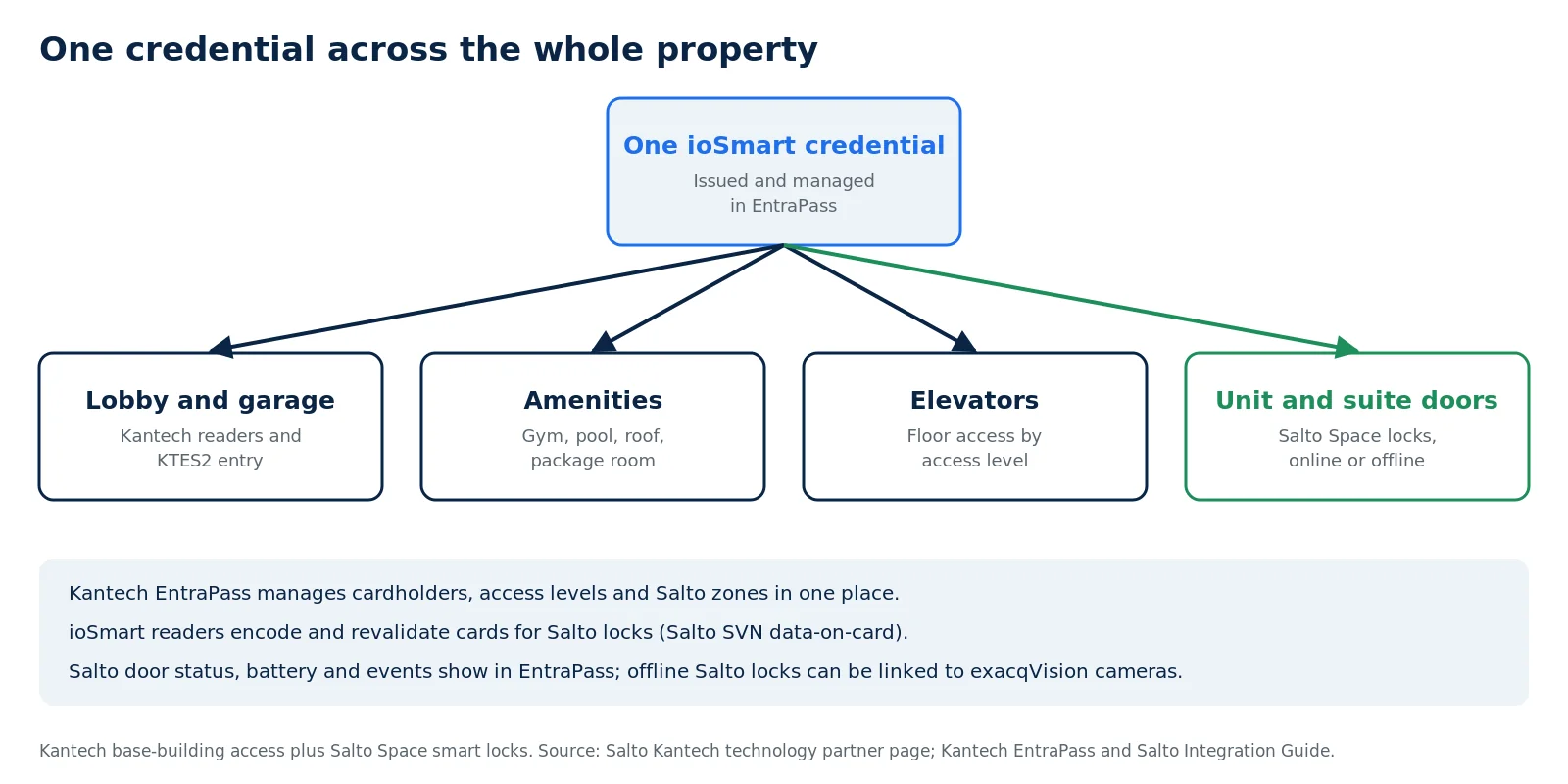
- Kantech and Salto today (shipping). EntraPass integrates with Salto Space, so Kantech can secure the base building while Salto smart locks secure individual units and suites, with one credential across the whole property. Salto doors import into EntraPass with an Integration Wizard, online and offline Salto doors are managed alongside Kantech doors, staff can see door and battery status and remotely unlock Salto online locks from EntraPass Web or the go app, and ioSmart readers encode Salto data-on-card credentials. exacqVision 26.1 now captures Kantech and Salto access events for search and alarms, and offline Salto locks can be linked to cameras.
- One phone credential for Kantech and Salto (announced). One mobile credential will cover Kantech doors and Salto locks, with Salto’s office mode available. No ship date yet.
In the showcase poll, mobile credentials were the technology most dealers are leading with, ahead of encrypted smart cards. That matches what we see with clients who want to retire card printing and speed up onboarding and offboarding.
EntraPass BACnet and T.Rex 2
- EntraPass BACnet (coming soon). A two way link between Kantech and BACnet building controllers. The first badge of the day can start HVAC, and a BACnet point like a CO2 or temperature alarm can trigger Kantech actions or pop up the right camera in exacqVision.
- T.Rex 2 and T.Rex 2 LT. Kantech’s request to exit sensor now includes two relays, a buzzer and a tamper switch, with an adjustable sensor and lenses, in white or black, with back plates for easy replacement.
- More languages. EntraPass now includes Hebrew and Arabic alongside English, French, Spanish, Italian, German, Dutch and others.
Exacq Intelligent Solutions with Scylla AI: AI analytics on the cameras you already own
Exacq’s product team framed the problem well. Security teams are stretched thin, monitoring is mostly reactive, and nobody wants to rip out cameras that still work. Exacq cited research that an operator can miss up to 95 percent of what they’re looking for after just 20 minutes of watching video.
For the first time, Exacq is selling Scylla AI servers and analytics licenses through its own channel. Here’s what Exacq and Scylla say it does:
- Threat detection: perimeter intrusion, smoke and fire, fight and aggression, vandalism.
- Safety and operations: slip and fall, traffic flow and occupancy, suspicious shopper behavior.
- Investigation: vehicle identification and tracking.
- Works with your cameras: Scylla runs on any camera that can send an H.264 or H.265 stream, regardless of manufacturer.
- Fewer false alarms: a second AI check verifies alarms before they’re sent. Scylla claims at least 95 percent accuracy for its analytics.
- One screen: alerts land in exacqVision, with a Scylla dashboard, configuration, analytic health and push notifications to the Exacq mobile app.
Two hardware paths. The Asteria line is a compact, pre-licensed box for smaller sites, built on NVIDIA Jetson and sold with one analytic such as intrusion detection or occupancy. Custom AI servers in 1U, 2U and 4U sizes handle large deployments that run several analytics at once. Licenses aren’t tied to a camera’s MAC address, so you can move an analytic from one camera to another.
exacqVision 26.0 to 26.2: what’s new for your security team
Exacq presented these as its 26.1 story, and most of them started shipping in exacqVision 26.0 in early 2026, with refinements in 26.1 (mid 2026) and 26.2 (released November 2026). All of them are available now.
AI camera inspection: find broken cameras before you need them
exacqVision compares each camera’s live picture with a reference image and flags the ones that changed: a camera knocked out of position, a blocked or dirty lens, a bird’s nest. Problem cameras float to the top, so a tech fixes them before an incident is missed. Version 26.1 made the inspections faster and more accurate, puts never inspected cameras first and lets you tune sensitivity per camera. For sites with hundreds or thousands of cameras, this replaces hours of “good picture, bad picture” checks.
Sign in with Microsoft Entra ID or Okta
exacqVision now connects to Microsoft Entra ID and Okta for single sign on across the desktop client, mobile app and servers, with multi factor authentication and group based permissions. When someone leaves your company, turning off their account in Entra or Okta also ends their video access. Enterprise Manager adds password policy controls, and 26.2 adds support for group information carried in ID tokens.
Secure remote access without open ports
The desktop client can now connect to sites remotely through the same cloud relay the Exacq mobile app uses, with a short code instead of port forwarding, firewall changes or a VPN. That lowers risk and lets BTI support your system remotely without a truck roll.
Kantech and Salto events inside exacqVision
Access granted, access denied and user activity from Kantech and from Salto locks connected through Kantech are now captured, displayed and searchable in exacqVision 26.1, and they can trigger alarms and automations. Version 26.2 also shows which Salto locks are offline locks and blocks online commands they can’t perform. The result: one place to see who opened a door and what the camera saw.
Enhanced dark mode for control rooms
An enhanced dark mode in the desktop client reduces eye strain for operators who watch video for long shifts in security operations centers and 24/7 control rooms.
ONVIF Profile T support
The exacqVision client is ONVIF Profile T conformant. That means better support for modern standards based cameras, including H.265 video, secure HTTPS streaming, audio and analytics metadata, on top of more than 6,600 camera models Exacq already supports. It protects your camera choices as new models arrive.
A mobile app built for response
Three upgrades turn the Exacq mobile app into an investigation tool:
- Multi camera search and playback. Review synchronized video from several cameras on one timeline from your phone and save the clips. (Exacq recommends up to four 4K streams at once for best performance.)
- VideoPush. Push live or recorded video from a phone to an operator’s PC, a video wall, another phone or a tablet.
- One Alerts center. System, device and event alerts, including camera edge analytics and Scylla AI detections, are kept in one Alerts page so nothing gets lost in your notifications.
Exacq Web: the browser becomes the main way to use Exacq
Exacq Web, released with exacqVision 26.2, brings the mobile app experience to any web browser: live video, search with thumbnails, playback, export, bookmarks, Monitor Wall and two way audio. One web login can cover all of your Exacq servers, from a single local NVR to multi server sites, so users go straight to the camera they need. It runs on your corporate network or through a secure VPN, using your existing users and permissions, with no client software to install.
Other 26.2 updates: expanded OAuth support for Entra ID and Okta, including group claims in access or ID tokens; clearer indicators for Salto offline locks; an expanded web panel view; and Axis OS 12 ACAP migration support.
Exacq said at the showcase that its goal is for Exacq Web to become the primary Exacq platform, with new features added continually.
Wasabi cloud archiving for exacqVision: what changed and what to confirm
Cloud video archiving isn’t new for exacqVision. Exacq added Wasabi S3 as an archiving target in exacqVision 24.09 (August 2024), after Johnson Controls and Wasabi announced their partnership on September 23, 2024. What changed at the 2026 showcase is who can use it and how it will be sold.
- Professional licenses (announced). Exacq said it is opening Wasabi archiving to exacqVision Professional licenses. It was previously limited to Enterprise. Wasabi’s own exacqVision setup guide, last updated October 24, 2026, still lists an Enterprise license as a requirement, so we confirm the license on each server before quoting.
- Sold through Exacq distribution (coming soon). Exacq said dealers will be able to sell Wasabi archiving directly through the Exacq distribution channel. Until those part numbers appear, a customer needs its own Wasabi account, a storage bucket and access keys.
- How it works. Archiving copies recorded video and audio from the exacqVision server to a Wasabi bucket on a schedule: continuously (checking every 5 minutes), until finished, or in a set window. You can archive everything or only specific events and alarms. An “At Most” expiration setting (30 days by default) deletes archived video older than the limit you choose, which helps with retention policies.
- Search from the cloud. After video ages off the local drives, operators can still search it in exacqVision. Direct Search lets workstations pull archived video straight from the bucket, even if the recording server is offline.
- Protection. Wasabi supports immutable buckets. When immutability is turned on, archived video can’t be changed or deleted before its retention period ends. That helps with ransomware, tampering and disaster recovery.
- Cost model. Wasabi charges for stored capacity, with no egress or API request fees, and offers pay as you go or reserved capacity terms. Pricing through the coming Exacq channel hasn’t been published, so BTI quotes it per project.
- Plan the bandwidth. Exacq warns that archiving can slow recording on a limited WAN connection, so schedule large uploads after hours and size the internet link for the cameras you plan to archive.
A common design: keep 30 days of video on the NVR for fast review, archive older or event video to Wasabi for 90 days or more, and use the cloud copy for disaster recovery if the NVR is damaged or stolen.
What this means for your business
The theme across every announcement was the same: one system, one screen, and a path forward without ripping out what already works. That’s good news, but it also means access control, video, identity and networking now depend on each other more than ever.
- Check your controllers and software versions. KTES2 needs EntraPass Corporate 9.21 or later, and Exacq Web needs exacqVision 26.2. KT-200 sites should plan an upgrade.
- Plan the network before the hardware. KTES2 needs continuous internet, Scylla needs camera streams and server capacity, and Exacq Web runs best on a segmented network or VPN. Cameras and controllers belong on their own VLANs with patched firmware.
- Connect security to identity. Single sign on with Entra ID or Okta, and one mobile credential across doors, means offboarding happens in one place instead of three.
- Use AI where it saves time. Start with one or two analytics tied to a clear response plan, like intrusion detection at entrances after hours or slip and fall in high traffic areas, and measure the false alarm rate.
- Decide where video lives. Set local and cloud retention days, confirm your exacqVision license edition, and size the internet link before turning on Wasabi archiving.
Why BTI
BTI Communications Group has been in business for over 40 years. We’re a Kantech Global Edition Certified Partner, and we design, install and support exacqVision video systems alongside Kantech EntraPass. Because BTI also runs managed IT and cybersecurity with a 24/7 NOC/SOC, we build the network, identity and security side of these systems too, not just the door and the camera.
- Kantech and KTES2: controller upgrades, EntraPass 9.21, tenant entry, elevator integration and mobile credentials. See our Kantech EntraPass access control partner page and Kantech support after installation.
- exacqVision and Scylla AI: upgrades to 26.2, Exacq Web, AI analytics and Wasabi cloud archiving design, including retention settings and bandwidth planning. See exacqVision VMS installation and support and video analytics software.
- Multi-tenant and multifamily: KTES2 tenant entry, Salto locks and video in one Kantech system. See Kantech for multi-tenant and multifamily buildings.
- Converged security: access control, video, network and cybersecurity under one team. See converged security and cybersecurity services.
- Local support: Kantech service in Los Angeles, Chicagoland and Phoenix and Tucson, and exacqVision service in Los Angeles, Chicagoland and Phoenix and Tucson.
Want to see which of these updates fit your buildings? Book a free consultation or contact BTI. Call our security team in Los Angeles at 562-298-5070, Chicago at 630-343-1322 or Phoenix at 480-291-8374, or call 800-HELP-BTI (800-435-7284) for nationwide multi-site support.
Industries we serve with Kantech and exacqVision
These are the commercial and institutional settings where BTI designs Kantech access control and exacqVision video. Each link opens the matching industry page, so you can see how the same platforms are applied in that environment.
- Multi tenant commercial buildings
- Office buildings
- Education
- Healthcare
- Government
- Manufacturing
- Logistics
- Parking and entertainment venues
Related reading
- Kantech EntraPass software guide: which edition is best for business
- Kantech, ExacqVision and DSC: open architecture for AI driven converged security
- 3 benefits ExacqVision servers and server upgrades offer enterprises
- Cybersecurity best practices for commercial IP cameras and door access control
- How to switch security system support without starting over
FAQ
What is the Kantech KTES2?
KTES2 is Kantech’s tenant entry system, built with MyDoorView and managed in EntraPass. It’s a 7 inch touchscreen video intercom with tenant app calling, guest controls, visitor PINs, elevator integration and a virtual QR code option, and there are no per tenant fees: the monthly subscription is based on entry panels and the feature package.
Does KTES2 work with my existing Kantech controllers?
KTES2 works with Kantech KT-1, KT-2, KT-4 and KT-400 controllers and needs EntraPass Corporate 9.21 or later. Kantech recommends upgrading older KT-200 controllers. BTI can check your system and versions during a free consultation.
What happens to KTES2 if the internet goes down?
Card access keeps working on the Kantech controller, but visitor calls and tenant services need the internet connection to the MyDoorView cloud. That’s why we design a reliable, secured network path for every KTES2 install.
Can Scylla AI analytics run on cameras we already have?
Yes. Exacq and Scylla say Scylla runs on any IP camera that can send an H.264 or H.265 stream, so you can add analytics like intrusion detection or slip and fall without replacing cameras. Alerts show up in exacqVision and the Exacq mobile app.
What do I need to use Exacq Web?
Exacq Web comes with exacqVision 26.2, so your recording servers need to be on version 26.2. BTI checks your server versions and licenses before upgrading and sets up access over your network or a secure VPN.
Can exacqVision Professional archive video to Wasabi?
Exacq announced at its 2026 showcase that Wasabi archiving is opening to Professional licenses; it was previously Enterprise only. Wasabi’s setup guide still lists Enterprise as a requirement, so BTI checks your server’s license edition and version before setting it up.
How is Wasabi cloud storage for security video priced?
Wasabi charges for stored capacity with no egress or API fees, either pay as you go or reserved capacity, and has minimum storage periods to plan for. Exacq has said Wasabi will also be sold through its distribution channel; that pricing isn’t public yet. BTI sizes storage and retention and quotes it per project.
Is the Exacq desktop client going away?
No. Exacq continues to update the desktop client. Exacq has said its goal is for the browser based Exacq Web to become the primary platform over time, with new features added continually.
Does BTI install and support Kantech and exacqVision?
Yes. BTI is a Kantech Global Edition Certified Partner and designs, installs and supports Kantech EntraPass and exacqVision, with offices in Los Angeles, Chicago and Phoenix.