Over 40 Years in BusinessISO 27001 compliantPublic sector: GSA contract holder

LA 562-298-5000 · Chicagoland 312-432-5300 · Phoenix 602-733-6807 · Client Support

Kantech multi-tenant and multifamily

Kantech Access Control and Tenant Entry for Multi-Tenant and Multifamily Buildings

One Kantech EntraPass system for the lobby intercom, common doors, elevators, unit and suite locks, and video. BTI designs, installs and supports it for mixed-use, commercial-residential and multi-tenant office buildings.

The short answer

Kantech's new KTES2 tenant entry system runs inside EntraPass, the same software that manages your doors and cardholders. Tenants and guests are managed in one place, visitors call tenants from a touchscreen panel or a QR code, and the Kantech controller still makes every door decision. There are no per tenant fees: the subscription is based on the number of entry panels and the feature package you choose. It works best in larger buildings and in portfolios that already run, or want to standardize on, Kantech.

Call our security team: Los Angeles 562-298-5070, Chicago 630-343-1322, Phoenix 480-291-8374, or nationwide 800-HELP-BTI (800-435-7284)
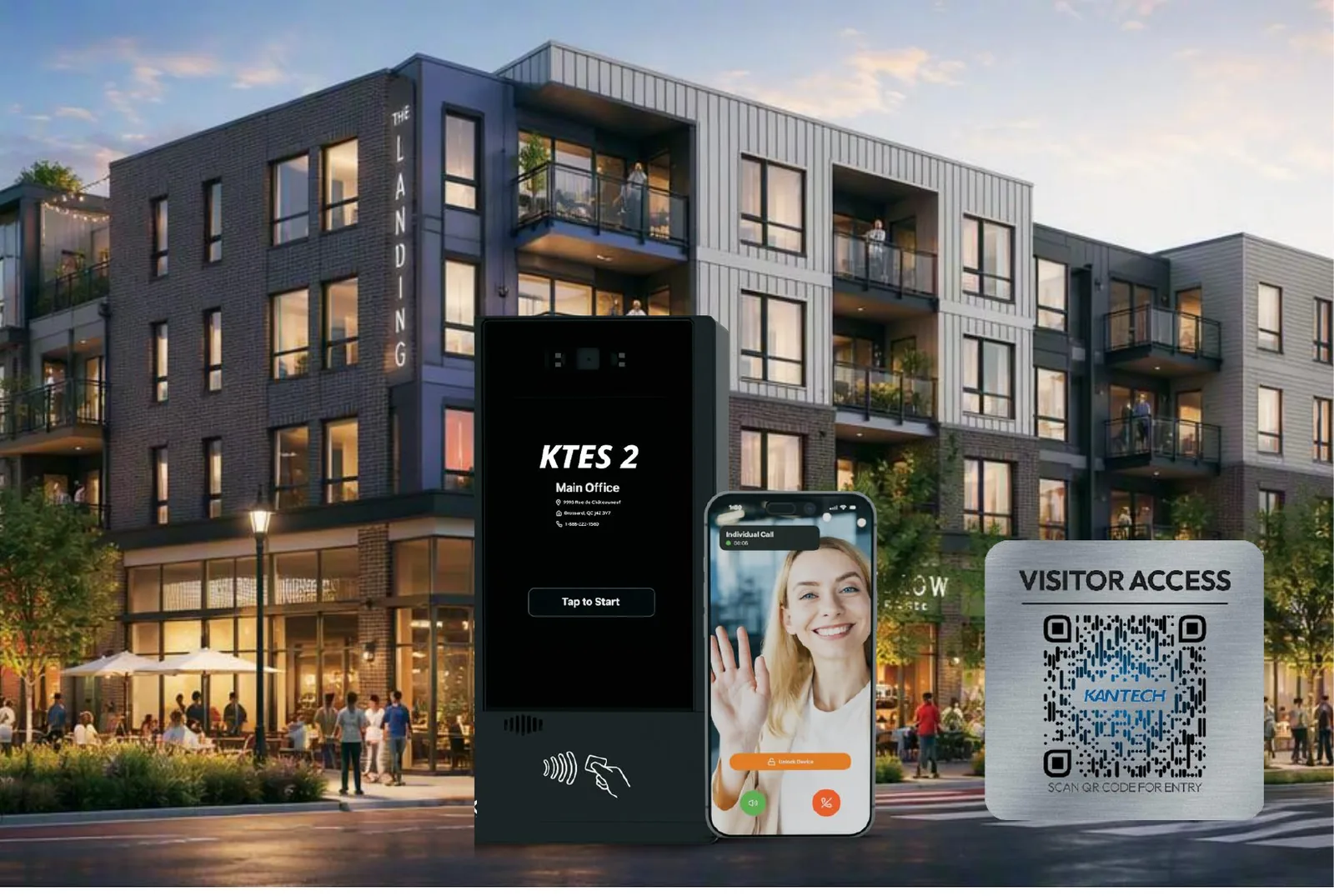
Kantech KTES2 touchscreen tenant entry panel, phone video call and virtual QR visitor access sign in front of a mixed-use apartment building

Who this is for

  • Mixed-use buildings with retail or offices on the ground floor and residences above, where each group needs its own doors, hours and visitor rules.
  • Commercial-residential and large multifamily buildings that want the lobby intercom, garage, amenities and elevators on the same system as their access cards.
  • Multi-tenant office buildings that need tenant-managed visitors, deliveries and after-hours entry.
  • Owners and property managers already on Kantech EntraPass who want to add tenant entry without a second platform.

Looking at access control for a commercial multi-tenant building on any platform? See our multi-tenant commercial buildings access control page.

Kantech KTES2 tenant entry, managed in EntraPass

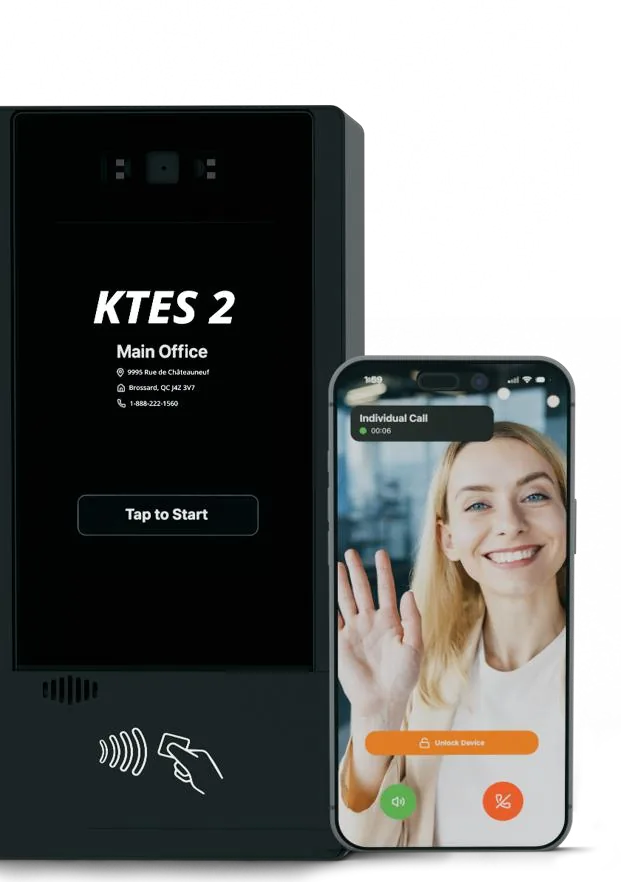
Kantech KTES2 7 inch touchscreen entry panel next to a phone showing an incoming video call from the lobby

KTES2 became available with EntraPass 9.21 (October 2026). What it does today:

  • Tenants and cardholders in one list. Property managers add tenants from the same Cardholders menu used for access cards, so move ins and move outs happen once.
  • Video or voice calls to tenants. Visitors tap the panel and call a tenant, who answers on a phone app with video or on a regular phone line and unlocks the door remotely.
  • Tenant-managed guests. Tenants add their own guests and grant access without calling the office.
  • Visitor PINs. Escorted access through Kantech-controlled doors, guiding visitors to the floor or suite they're allowed to reach.
  • Elevator access for visitors. KTES2 ties into Kantech elevator control without extra cabling between the panel and the controller.
  • Delivery agents. Give couriers controlled access to lobbies or package rooms, with a full audit trail.
  • Reports in EntraPass. Access reports for tenants, guests and delivery agents come from the same reporting system you already use.

The entry panel. A 7 inch, 400 nit touchscreen with a 2MP camera, an IK08 impact rating, built-in VoIP calling and two onboard relays. It runs on PoE+ or 12V power, supports flush, surface or hooded mounting, and can include an internal ioSmart reader so the panel doubles as a card reader. An external long range reader can be wired to the KT controller, and Cat 6 PoE+ runs up to 200 feet. Flush, surface and hooded back boxes are available. There's no SIP server or phone plan to set up.
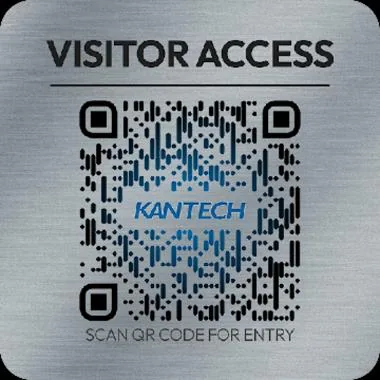
Kantech virtual QR KTES2 visitor access sign with a scannable QR code

Virtual QR entry points. A printed QR code becomes an entry panel on the visitor's own phone. It's ideal for side gates, garages, amenity doors and temporary entrances, with no wiring at the door beyond the Kantech-controlled lock. An optional geofence makes sure it only works on site.
How it works

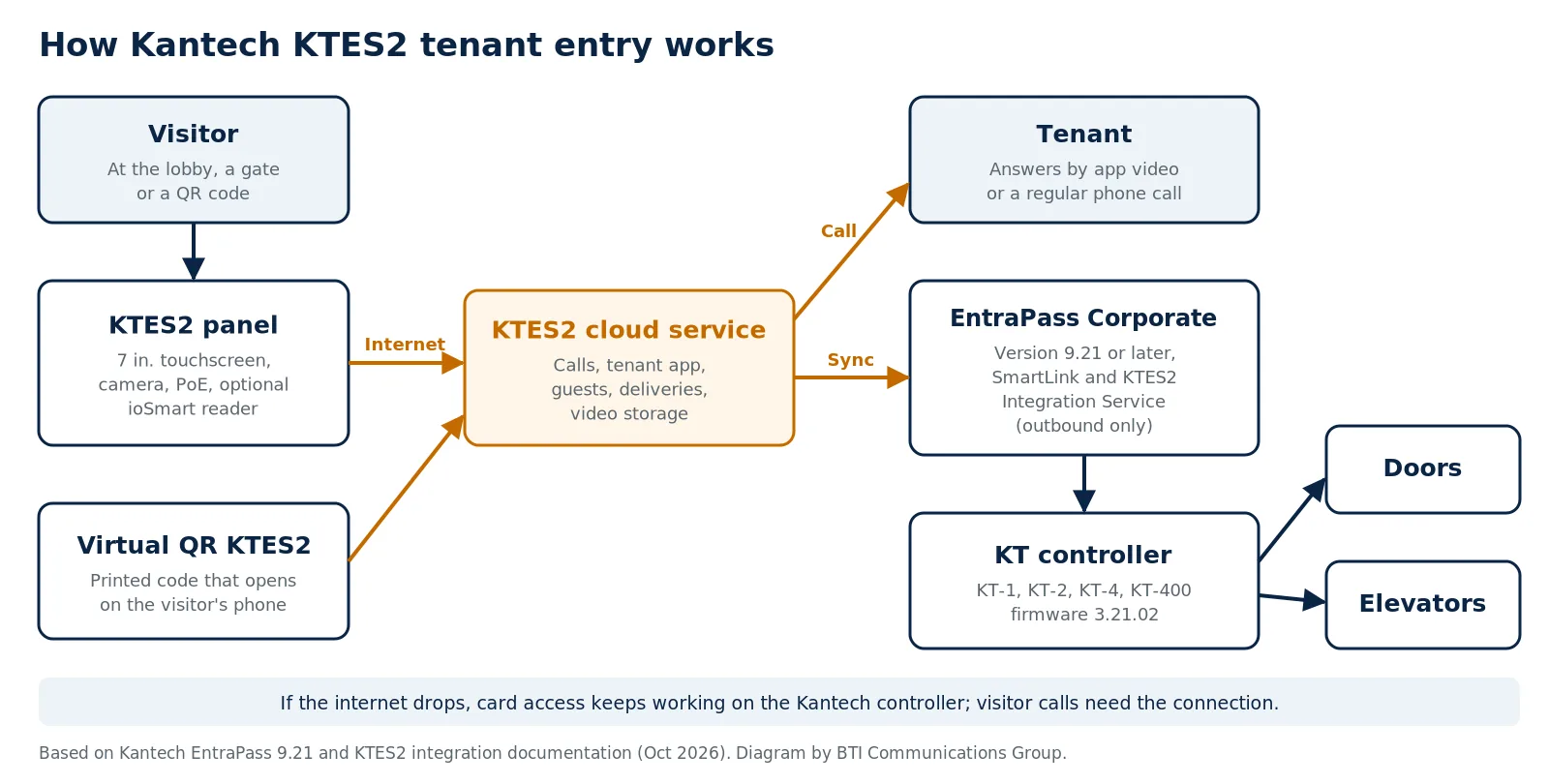
Diagram of Kantech KTES2: visitor at the panel or QR code, KTES2 cloud service, tenant call, EntraPass Corporate 9.21 and KT controller opening doors and elevators
  1. A visitor taps the KTES2 panel or scans the QR code.
  2. The call goes through the KTES2 cloud service to the tenant, who answers and unlocks.
  3. EntraPass Corporate 9.21 or later, connected outbound only through SmartLink, tells the Kantech controller to open the door or enable the elevator floor.
  4. The KT controller (KT-1, KT-2, KT-4 or KT-400 on current firmware) makes the door decision and logs the event.

If the internet drops, card access keeps working on the Kantech controller; visitor calls and tenant services need the connection. That's why BTI designs the building network, internet failover and cybersecurity along with the doors.
KTES2 packages and licensing

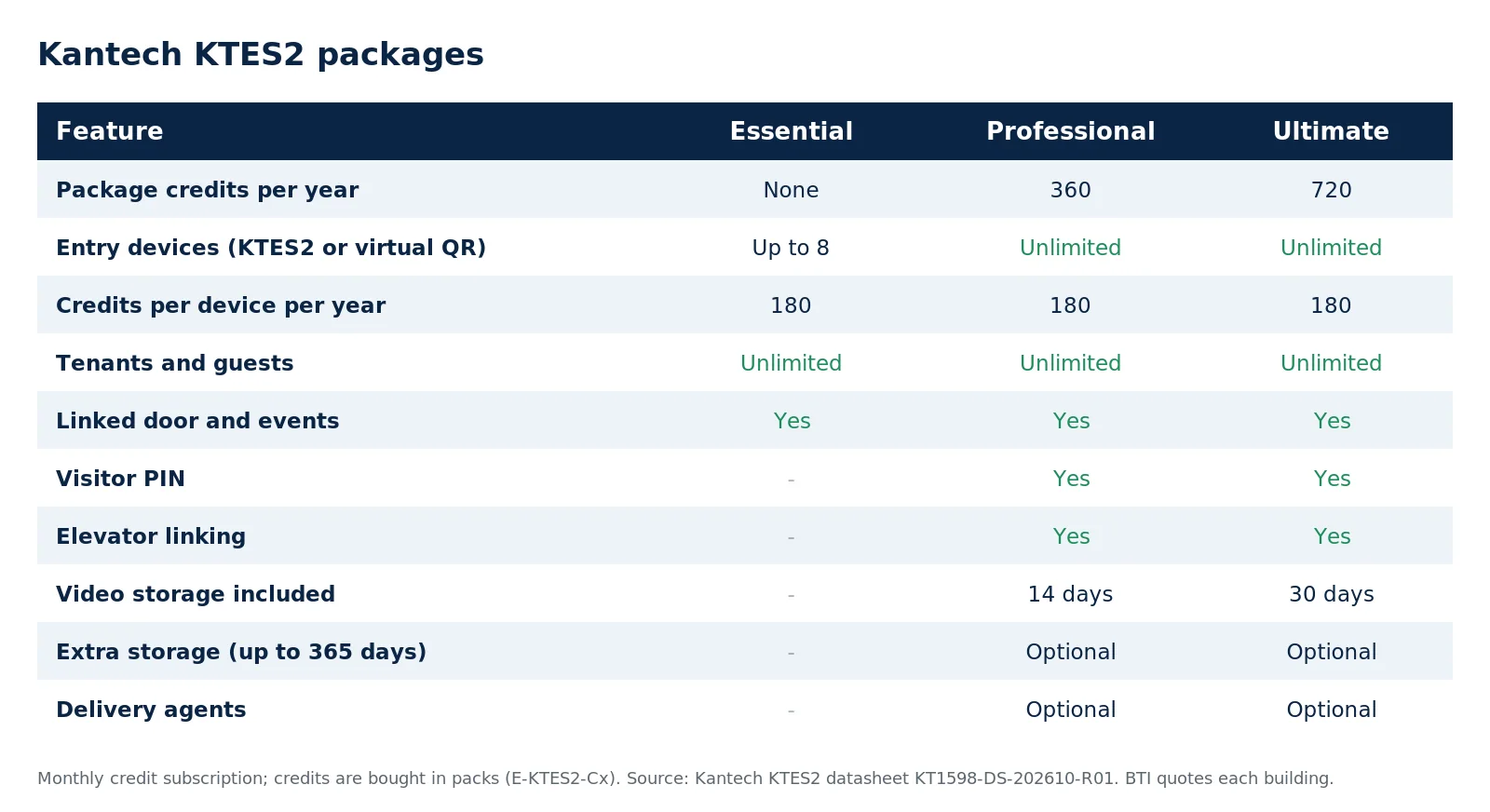
Kantech KTES2 package comparison table for Essential, Professional and Ultimate

KTES2 uses a monthly credit subscription. There are no per tenant or per apartment fees: you pay for the package and the entry devices, so move ins and move outs never change the bill.

Feature Essential Professional Ultimate
Package credits per year None 360 720
Entry devices (KTES2 panel or virtual QR) Up to 8 Unlimited Unlimited
Credits per entry device per year 180 180 180
Tenants and guests Unlimited Unlimited Unlimited
Linked door and events Yes Yes Yes
Visitor PIN Yes Yes
Elevator linking Yes Yes
Video storage included 14 days 30 days
Extra video storage, up to 365 days Optional, for a fee Optional, for a fee
Delivery agents Optional Optional

Credits are bought in packs and used monthly, so capacity and features can be added as the building changes.
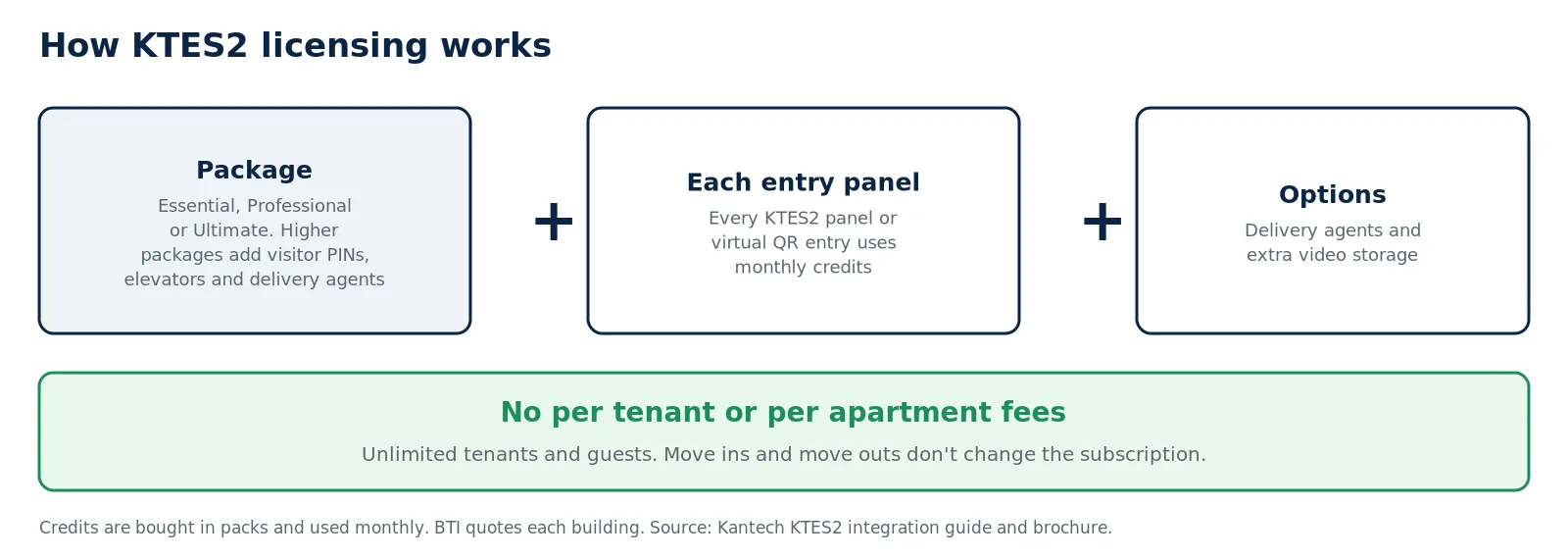
Diagram showing KTES2 licensing as a package plus monthly credits per entry panel plus options, with no per tenant fees

BTI sizes the package for your building and quotes it with the hardware and installation.
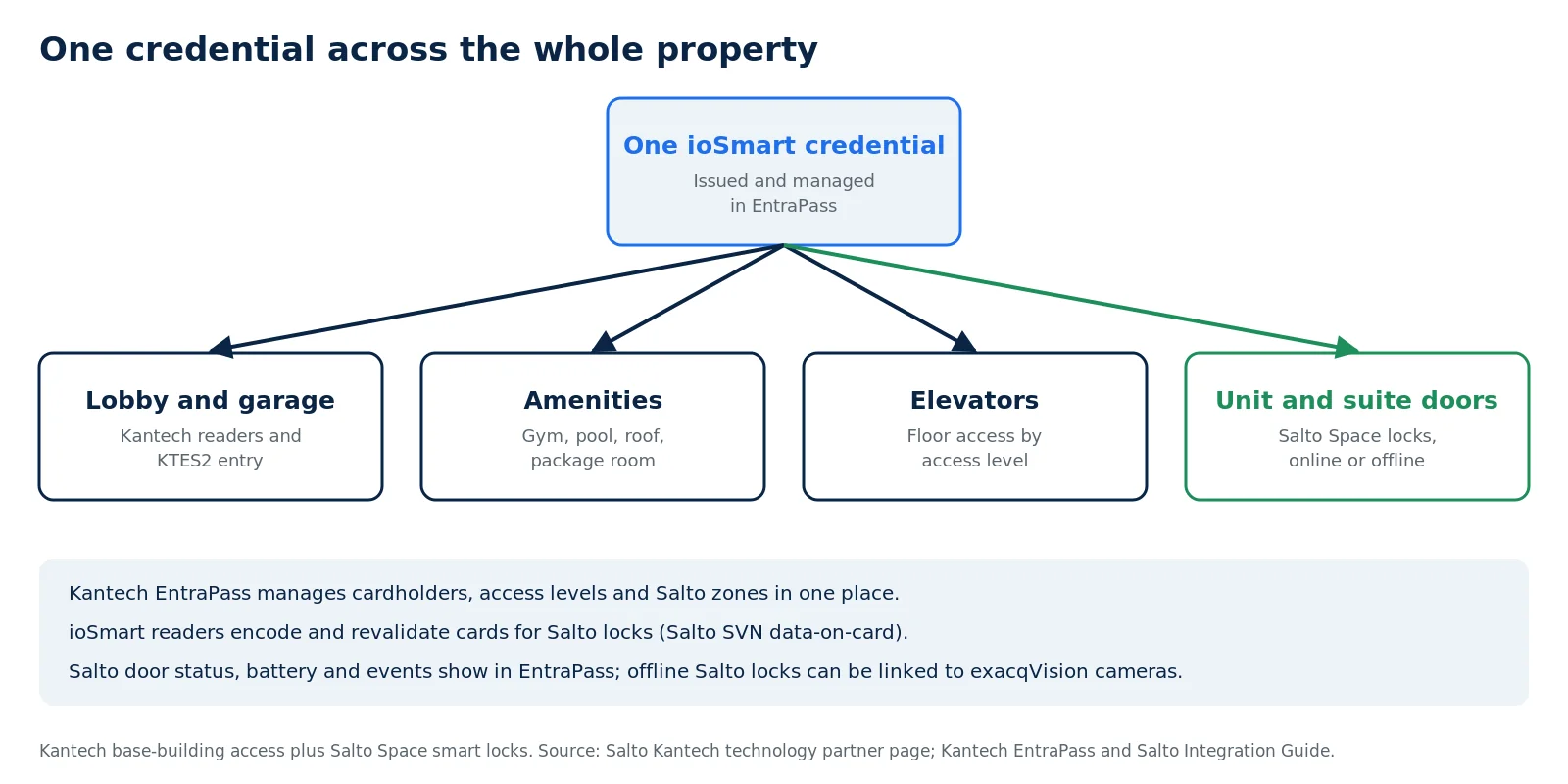
One credential for the whole property: Kantech plus Salto

Diagram of one ioSmart credential opening the lobby, garage, amenities, elevators and Salto unit locks, all managed in Kantech EntraPass

For multifamily and mixed-use buildings, Kantech runs the base building (lobby, garage, amenities, elevators) and Salto Space smart locks secure the individual units and suites. Residents and tenants carry one credential across the entire property. This integration is shipping today:

  • Integration Wizard. Salto doors are imported into EntraPass sites in seconds, without reprogramming.
  • Blended doors. Salto online and offline doors sit alongside Kantech doors in EntraPass, so staff manage every door in one place.
  • Door status and remote unlock. See Salto door status, including battery level and door openings, and remotely unlock Salto online locks from EntraPass Web or the go mobile app.
  • Built-in PPD control from EntraPass.
  • Salto events in EntraPass. Run reports, trigger pop-ups and email notifications, and tie events to video like any other door.
  • Cardholders and access levels. Program Kantech and Salto cardholders and manage Salto zones with native EntraPass access levels.
  • ioSmart readers and cards as Salto points. ioSmart readers encode and revalidate ioSmart cards with Salto SVN data-on-card technology, for access and a full audit trail on Salto locks.
  • Video for offline locks. With the EntraPass exacqVision integration, offline Salto locks can be associated with cameras so operators can review the video.
  • Hattrix cloud. Kantech's hosted Hattrix service also integrates Salto Space doors, for owners who want to manage from anywhere.

Announced, not yet released: a rebuilt tap-and-go go Pass phone credential that will work on both Kantech doors and Salto locks, and a BACnet integration with building automation.
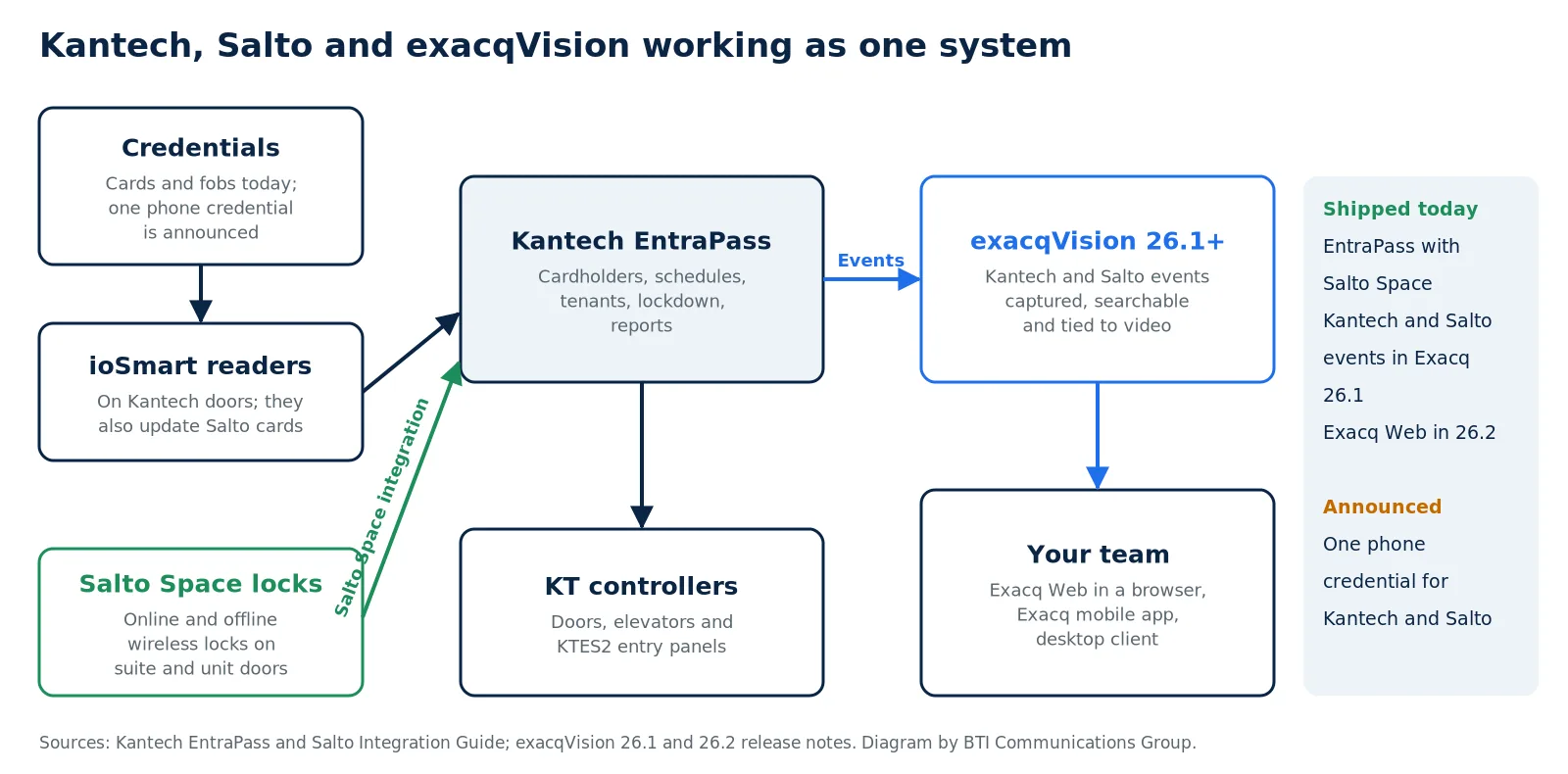
Video with exacqVision 26.1 and 26.2

Diagram of credentials, ioSmart readers and Salto Space locks feeding Kantech EntraPass, with events going to exacqVision 26.1 and Exacq Web
  • Door events with video (26.1). exacqVision captures Kantech and Salto access granted, access denied and user activity events, makes them searchable and can trigger alarms.
  • Salto offline lock visibility (26.2). exacqVision shows which Salto locks are offline locks and blocks online commands they can't perform.
  • Exacq Web (26.2). Property and security staff can watch live video, search, play back and export from a browser, anywhere on the corporate network or through a secure VPN, using the users and permissions you already have.
  • Sign in with Microsoft Entra ID or Okta. 26.2 expands OAuth support, including group claims in access or ID tokens, so building staff permissions follow your identity system.
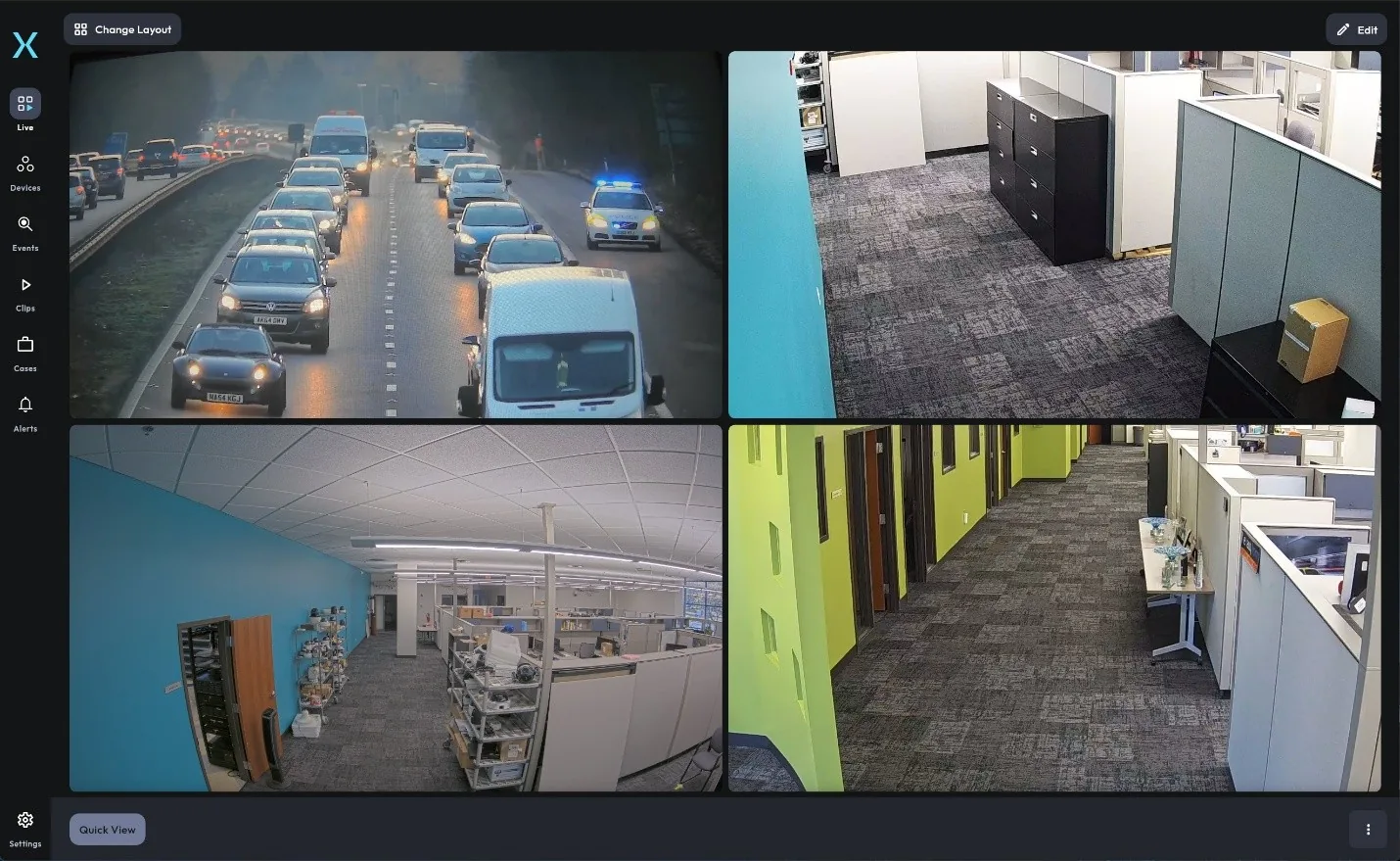
Exacq Web live view in a browser showing four cameras

What BTI handles

  • Survey and design: entry points, panel placement and mounting, door and elevator zones, tenant and landlord roles, and the network path for every panel.
  • Installation: KT controllers, readers, locks, KTES2 panels and virtual QR points, elevator interfaces and exacqVision cameras and servers.
  • EntraPass setup: EntraPass Corporate 9.21 or later, SmartLink, tenant import and the KTES2 account.
  • Network and cybersecurity: PoE+ switching, Cat 6 cabling, internet failover and security for the cloud connection, backed by a 24/7 NOC/SOC.
  • Support after go-live: remote and on-site service, upgrades and controller replacement. See Kantech support after installation.

Before you start

  • KTES2 needs EntraPass Corporate Edition 9.21 or later and a continuously running EntraPass and SmartLink server.
  • Controllers must be KT-1, KT-2, KT-4 or KT-400 on current firmware. Older KT-200 and KT-300 controllers need an upgrade, which BTI can plan with you.
  • Users created through LDAP aren't compatible with KTES2.
  • Each entry panel needs a continuous internet connection (Ethernet preferred), and EntraPass must stay running and online.
  • Cloud video storage and video playback for KTES2 are viewed in the KTES2 cloud portal.
  • Not sure which EntraPass edition you have? Read our Kantech EntraPass software guide.

What's new from Kantech and Exacq

We break down KTES2, EntraPass 9.21, Salto integration, exacqVision 26.1 and 26.2 and Exacq Web in our Kantech KTES2 and Exacq 2026 updates post. For the full platform, see our Kantech EntraPass partner page and exacqVision partner page.

Why BTI

BTI Communications Group has been in business for over 40 years. We're a Kantech Global Edition Certified Partner, and we design, install and support Kantech EntraPass and exacqVision with local teams in Los Angeles, Chicagoland and Phoenix. Because BTI also delivers managed IT and cybersecurity with a 24/7 NOC/SOC, we build the network and security behind tenant entry, not just the door.

FAQ

Frequently asked questions

What is Kantech KTES2?

KTES2 is Kantech's tenant entry system, managed inside EntraPass. It combines a 7 inch touchscreen video entry panel and virtual QR entry points with tenant calling, tenant-managed guests, visitor PINs, delivery access and elevator integration. It became available with EntraPass 9.21 in October 2026.

Is KTES2 licensed per tenant or per apartment?

No. Tenants and guests are unlimited in every package. KTES2 uses a monthly credit subscription: Essential has no package credits and supports up to 8 entry devices, Professional and Ultimate use 360 or 720 package credits a year with unlimited devices, and each KTES2 panel or virtual QR entry uses 180 credits a year. BTI sizes and quotes it for each building.

Is Kantech a good fit for apartments and condos?

It's strongest in larger multifamily, mixed-use and commercial-residential buildings, and in portfolios that already use Kantech EntraPass, because one system covers the lobby intercom, common doors, elevators and unit locks. BTI will tell you during a free consultation if another platform fits your building better.

What happens to KTES2 if the internet goes down?

Card access keeps working on the Kantech controller. Visitor calls and tenant services need the internet connection, so BTI designs a reliable, secured network path and failover for every installation.

Can KTES2 give visitors elevator access?

Yes. With the Professional or Ultimate package, KTES2 links to Kantech elevator control so a visitor can reach only the tenant's floor, without extra cabling between the panel and the controller.

Does Kantech work with Salto locks on suite and unit doors?

Yes. Kantech EntraPass integrates with Salto Space, so Kantech secures the base building and Salto smart locks secure the units, with one credential across the property. Online and offline Salto locks are managed in EntraPass, and exacqVision 26.1 records Kantech and Salto door events with video. A single phone credential for Kantech and Salto has been announced but isn't released yet.

Can we see video of who came through a door?

Yes. exacqVision 26.1 and later capture Kantech and Salto access events and link them to video, and Exacq Web in exacqVision 26.2 lets staff search and review that video in a browser.

What do we need to run KTES2?

EntraPass Corporate Edition 9.21 or later with SmartLink, KT-1, KT-2, KT-4 or KT-400 controllers on current firmware, and a reliable internet connection at each panel. BTI checks your system and plans any upgrades.

Who installs Kantech for multi-tenant buildings in Los Angeles, Chicago and Phoenix?

BTI Communications Group, a Kantech Global Edition Certified Partner with offices in Santa Fe Springs, Downers Grove and Phoenix. Call 562-298-5070 in Los Angeles, 630-343-1322 in Chicago or 480-291-8374 in Phoenix.

Plan tenant entry and access control for your building

Tell us about your building, entrances and current system, and we'll map the right Kantech setup.

Call our security team: Los Angeles 562-298-5070, Chicago 630-343-1322, Phoenix 480-291-8374, or nationwide 800-HELP-BTI (800-435-7284)

IT Services

Let's Start a Conversation

What's the best way for us to contact you?

Top quality brands, expert engineering, transparent cost, and measurable ROI.