Over the past week, attackers went after the tools IT teams use to manage everything else. Fake “customers” in a popular remote support tool reached back into technicians’ computers. Attackers broke into the servers that run firewalls at 22 organizations. Password manager 1Password and task app Todoist both disclosed breaches that started with stolen developer credentials. Microsoft fixed two cloud flaws that exposed stored secrets and administrator email addresses. And on November 19, Anthropic, the maker of Claude, began trading on Nasdaq in the largest IPO on record. That puts a sharper question in front of every business: when your staff paste data into an AI tool, what actually protects it? A terms of service page, or controls someone enforces? This update covers what happened, what to patch now, and how to keep AI data security under your control.
This week’s recap: attacks on the tools that run your IT
Several items this week were first flagged in our security partner Galactic’s Threat Thursday for November 25, 2026.
ConnectWise ScreenConnect turned against technicians. Huntress reports attackers exploited CVE-2026-84869 in ConnectWise ScreenConnect, a widely used remote support tool. ConnectWise fixed the flaw in September, and CISA added it to its exploited list on September 11. A “guest” who joins a support session can send a file to the technician’s computer and get it to run without a prompt. Across 42 IT providers’ servers between October 20 and November 16, attacker guests made about 688,000 “run file” requests while they waited for a technician to join. On November 12, one technician’s computer was taken over in about 9 seconds. The fix has to reach every technician’s own app and agent, so updating the server alone isn’t enough. A technician’s computer usually holds saved passwords, admin tools and access to every customer, so this matters to any business that relies on an outside IT provider. It’s a good week to ask yours how it protects remote access.
1Password and Todoist breached through developer accounts. On November 25, 1Password said it began investigating on November 19 after signs that an attacker had taken over an employee’s corporate GitHub account. The attacker pushed malicious code to backend services and copied names, email addresses and account metadata for a subset of customers. 1Password says vault contents and the keys that protect them were not affected, and it has rotated internal credentials. Todoist said an attacker used a stolen credential for its version control system between November 22 and 23 to obtain more credentials, take over an employee’s work account and reach its cloud systems. The attacker downloaded email addresses and older password hashes for about 6% of users. Both incidents started with the credentials developers and admins hold, not with the products themselves.
Firewall management servers breached at 22 organizations. GreyNoise reported on November 23 that an attacker it tracks as GT13 broke into 24 Check Point Security Management Servers at at least 22 organizations in 17 countries, including the United States, between October 17 and November 2. The attacker used a SmartConsole login bypass (CVE-2026-16232) that Check Point disclosed in July, and GreyNoise says it saved command results and data stolen from all 24 servers. GreyNoise believes the attacker used AI tools for much of the scanning and exploitation and expects the campaign is ongoing. Check Point says the flaw and its protections aren’t new and advises customers to restrict management server access to trusted networks.
Microsoft cloud services exposed stored secrets and admin contacts. Microsoft found a flaw in the Classic tiers of Azure API Management on November 18 and closed it on November 19. In an advisory to customers, Microsoft said “an unauthorized party could have used the issue to access secrets stored in Azure API Management Classic instances” and that its fix “does not automatically invalidate credentials that may have been accessed.” Norway’s National Security Authority linked the flaw to attacks on energy companies Equinor and Skagerak Energi, both of which say no data was stolen. Separately, Microsoft began notifying customers on November 20 that a flaw in Entra Connect Health, introduced July 23 and fixed November 19, gave attackers read-only access to administrator and technical contact email addresses, tenant names, domains and license tiers. No passwords, tokens or valid keys were exposed, but that information is exactly what a convincing phishing email needs.
Cisco video calling gateway on CISA’s exploited list. CISA added CVE-2026-76466, a critical flaw (rated 9.8) in clustered Cisco Expressway gateways, to its Known Exploited Vulnerabilities catalog on November 20. It lets an attacker run commands as root without logging in. Cisco released the fix on October 21 and says there are no workarounds.
Closer to home. In Will County, Wilmington School District 209-U reported a ransomware attack on November 17 and suspended district laptops and Windows devices while specialists investigated. In San Diego County, KPBS reported on November 24 that the Rhysida ransomware group claims to have stolen 8 terabytes of data from the City of El Cajon, which confirmed a “network security incident” on September 27 but hasn’t commented on the claims. Overseas, Osaki Electric in Japan halted production after a ransomware attack it traced to compromised VPN authentication, and London Gatwick said a third-party drop-off payment system exposed some customers’ details.
Microsoft’s final outage report. Last week we said we’d update you when Microsoft published its final report on the November 12 to 13 Microsoft 365 outage. It came out November 20. Microsoft wrote that its “testing did not adequately represent the combination of hardware and traffic mix encountered during this incident” and listed 13 next steps, including testing that better matches production. It also found that safeguards meant to contain the failure spread it instead. That’s the same reason BTI tests and whitelists patches as part of our routine managed patching instead of pushing vendor updates straight into production.
Fortinet: patch cadence is now weekly
Fortinet products sit in the same place as the other admin tools in this update: in the middle of the network, where one unpatched appliance can open a path to everything behind it. Over the past six weeks Fortinet has published new advisories on a tight cadence, including a large set on November 10 covering FortiOS, FortiManager, FortiAnalyzer and FortiMail. CISA also added two Fortinet flaws to its Known Exploited Vulnerabilities catalog in October. If you run these products, treat patching as a standing job, not a one-time event.
These are the confirmed items that matter most, drawn from Fortinet PSIRT, CISA’s KEV catalog and NVD. Severity and CVSS scores are from the Fortinet advisory. Apply the fixed release listed there.
- CVE-2026-104286 (FortiMail, published October 1, 2026). A path traversal flaw that may let an unauthenticated attacker write files on the system. Critical, CVSS 9.8. Fortinet says it has been exploited in the wild. CISA added it to the KEV catalog on October 1. Upgrade to FortiMail 8.0.2, 7.6.7 or 7.4.9, or migrate 7.0. A 7.2 fix was still listed as upcoming in the advisory.
- CVE-2025-61624 (FortiOS, FortiPAM, FortiProxy and FortiSwitchManager). A path traversal flaw that may let an authenticated admin write or delete files through CLI commands. Medium, CVSS 6.0. Fortinet marks it as known exploited. CISA added it to the KEV catalog on October 16 (the advisory was first published April 14). Upgrade FortiOS to 7.6.5 or 7.4.10, or migrate older trains as the advisory directs.
- CVE-2026-107656 (FortiSandbox and FortiSandbox PaaS, published October 13, 2026). Improper access control and session management in the web management interface. Critical, CVSS 9.6. Not listed as known exploited. Upgrade to 5.0.7 or 4.4.10, or migrate versions the advisory marks for migration.
- CVE-2026-126259 (FortiOS, published November 10, 2026). Missing authentication that may let an unauthenticated, adjacent attacker run commands through HA. Critical, CVSS 9.0. Not listed as known exploited. Upgrade to 8.0.1, 7.6.8, 7.4.13 or 7.2.14, or migrate 7.0.
- CVE-2026-126261 (FortiManager, published November 10, 2026). An authorization flaw in FGFM that may let an unauthenticated attacker who can reach the FGFM port run code or commands. Critical, CVSS 9.0. Not listed as known exploited. Upgrade to 8.0.1, 7.6.8, 7.4.6 or 7.2.9.
- CVE-2026-126253 (FortiOS and FortiSASE, published November 10, 2026). An authentication bypass in the OSPF daemon. Critical, CVSS 9.3. Not listed as known exploited. Upgrade FortiOS to 8.0.2, 7.6.8, 7.4.13 or 7.2.14. Fortinet says FortiSASE 26.3.2 already includes the fix.
What to do now. Patch to the fixed releases in each advisory. Keep FortiOS, FortiManager, FortiMail, FortiSandbox and FortiSIEM management interfaces off the internet, and allow access only from dedicated admin computers. For the two KEV items, especially the FortiMail flaw Fortinet says has been used in the wild, review the advisory and check for signs of compromise if the system was unpatched and reachable. If you need a tested patch process and 24/7 coverage, a managed cybersecurity program can keep weekly vendor drops from sitting unapplied.
This week’s patch list: the admin tools that hold the keys
Each item below sits in the middle of an IT environment, so one compromise can reach everything it manages.
- VMware vCenter and ESX (VMSA-2026-0011, November 24). CVE-2026-123903 (rated 9.8) lets anyone who can reach vCenter on the network skip the login. CVE-2026-123910 and CVE-2026-123911 (both 9.8) can let an attacker with network access to ESX run code on the host. It arrives days after a separate vCenter flaw was used by a suspected China-linked group, and CISA added that earlier flaw (CVE-2026-123890) to its exploited list on November 20. Action: update vCenter (9.1.2, 9.0.2.0300 or 8.0 U3m), then ESX and VMware Tools separately, since each needs its own update. Broadcom lists no workaround for the vCenter flaw. Limit vCenter access to a small set of admin computers, and plan to move off vCenter 7, which only gets fixes through extended support.
- ConnectWise ScreenConnect (CVE-2026-84869). Action: update every technician app and access agent to version 26.6.5 or later. Until then, turn off guest file transfers, remove unexplained sessions, and don’t join sessions you can’t tie to a real customer.
- Cisco Expressway (CVE-2026-76466). Action: upgrade to X15.5.20. X14 and earlier must move to a fixed release.
- Check Point Security Management Servers (CVE-2026-16232). Action: confirm the latest updates are installed, allow only approved admin computers to connect, and have your IT team check for the warning signs GreyNoise published. If there are signs of access, treat copied certificates and settings as compromised.
- Azure API Management Classic. Action: assume secrets stored there were exposed. Create each replacement key or password where it was issued, then retire the old one. Microsoft’s guidance warns that updating the value in API Management alone doesn’t invalidate the old credential.
- Microsoft Entra Connect Health. Action: there’s nothing to install. Check Azure Service Health by signing in directly, not through email links. Require phishing-resistant MFA for admin accounts, and warn admins to expect convincing scam emails that mention real tenant details.
- Websites (CISA, November 24). CISA added three more exploited flaws, including a Drupal core installer flaw (CVE-2026-132165) and an abandoned ASP.NET anti-forgery library (CVE-2026-131914). Action: update Drupal to 10.6.22, 11.3.22 or 11.4.13, and remove the abandoned library from any site that uses it.
Cameras, access control and phone systems sit on the same infrastructure. Video management servers often run as virtual machines on VMware. Video calling and phone gateways like Expressway are internet-facing on purpose. Door controllers and NVRs are managed from the same admin computers as everything else. Keep management interfaces off the internet and limit who can reach hypervisors and remote support tools. From networks, cloud and AI to cybersecurity, data governance and connectivity, BTI designs, sells, installs and commissions it all, including access control, alarm and camera systems that feed your security operations and business intelligence. That means one partner can check both your IT and your security systems.
New this week in AI: the Anthropic IPO, AI-built shields and AI agents as “users”
Anthropic goes public. Anthropic priced its IPO on November 18 at $83 per share, and its Class A shares began trading on the Nasdaq Global Select Market on November 19 under the symbol “ANT.” Nasdaq reported the stock opened at $111.50. When the offering closed on November 20, Anthropic said gross proceeds were about $93.5 billion, or about $119.5 billion including a concurrent $26 billion private placement with AMD, Broadcom, Google, Micron, Microsoft, NVIDIA and TSMC. The AP reported the pricing valued the company at $1.5 trillion, the biggest Wall Street debut of all time. Claude is now one of the most widely used AI tools at work, which is why the data questions below matter more than ever. If your teams are already building with Claude and hitting its limits, see our guide to what to do when you hit the Claude wall and bring those apps into a governed Azure environment.
OpenAI and Cisco release a free AI-built “shield” tool. On November 23, OpenAI and Cisco released Shirudo, an open-source tool for Linux servers. When a new flaw is announced, a temporary safeguard called a shield can block that specific attack on a running system without a restart, and an operator approves each shield before it goes live. In OpenAI’s controlled test, a shield generated with its Codex tool blocked an exploit attempt for the Java flaw we covered last week. It’s early: it runs only on Linux, and a shield is a stopgap, not a fix.
AI is speeding up attacks too. GreyNoise believes the firewall management campaign above used AI tools and agentic systems for scanning, exploitation and tool building. This week’s lesson is the same as last week’s: the time between a fix and an attack keeps shrinking.
UK regulators: treat AI agents like users. On November 24, Finance Magnates reported on UK proposals from the FCA, the PRA and the Bank of England that would count AI agents and automated processes as system “users.” Firms would apply least privilege and zero trust access to them, keep detailed, unchangeable logs of what autonomous AI does, and stamp out unapproved shadow AI tools. The FCA separately warned that AI agents that move money or make investment decisions may need authorization. The proposals target UK financial firms, but they show where AI governance expectations are heading.
A U.S. bill to govern AI agents on federal networks. On November 18, Rep. Matt Van Epps introduced the AI INSIGHT Act. It would set a framework for identifying AI agents on federal civilian systems, limiting their access to what their tasks require, monitoring their activity and suspending access when needed, with CISA providing support. It applies to federal agencies, not businesses, but the controls are a useful checklist for anyone deploying AI agents.
AI data security: can you trust an AI platform’s terms of service?
Most AI platforms publish clear commitments about business data, and the major ones are worth reading. They help. But they don’t do the job of governance on their own.
What the terms do say. OpenAI’s enterprise privacy page says that for ChatGPT Business, Enterprise and its API, “we do not train our models on your data by default.” Anthropic’s consumer terms update says that for Claude Free, Pro and Max, it “will train new models using data from Free, Pro, and Max accounts when this setting is on,” with data kept for five years if users allow training and 30 days if they don’t. Anthropic says those consumer changes don’t apply to its commercial offerings, such as Claude for Work and its API. These are real commitments, and the business tiers are a big step up from free accounts.
What the terms can’t do. A terms of service page governs what the vendor does with data after it arrives. It doesn’t:
- Stop the data from leaving. Nothing in a vendor’s terms keeps an employee from pasting a customer list, a Social Security number or a contract into a prompt. Once it’s sent, it lives under someone else’s retention and security.
- Cover personal accounts. The same person can use a company business account in one tab and a free personal account in another. The protections follow the account, not the employee. That’s shadow AI.
- Enforce your settings. Training and retention options are often per-user toggles that can change when terms change. Anthropic gave existing users until October 8, 2025 to choose.
- Make the vendor breach-proof. This week, two well-run software companies, 1Password and Todoist, disclosed breaches that began with stolen developer credentials. That’s no comment on any AI vendor. It’s a reminder that data you never send can’t be exposed in someone else’s incident.
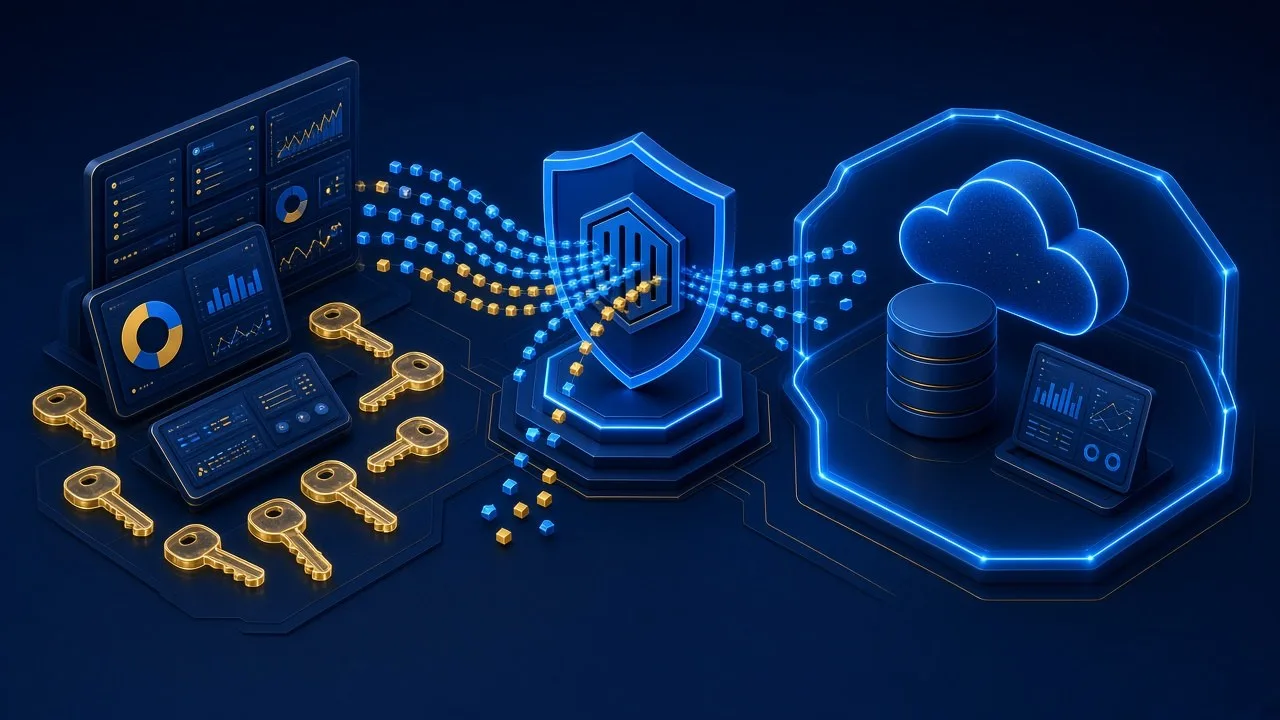
What enforced governance adds. Governance tools put the controls on your side of the connection. They’re set by policy, apply to every user and device, and log what happened. The diagram below shows how that works in a private, isolated Azure tenant managed by BTI. BTI-managed governance controls sit around the managed AI workspace; they are not features of the workspace itself.
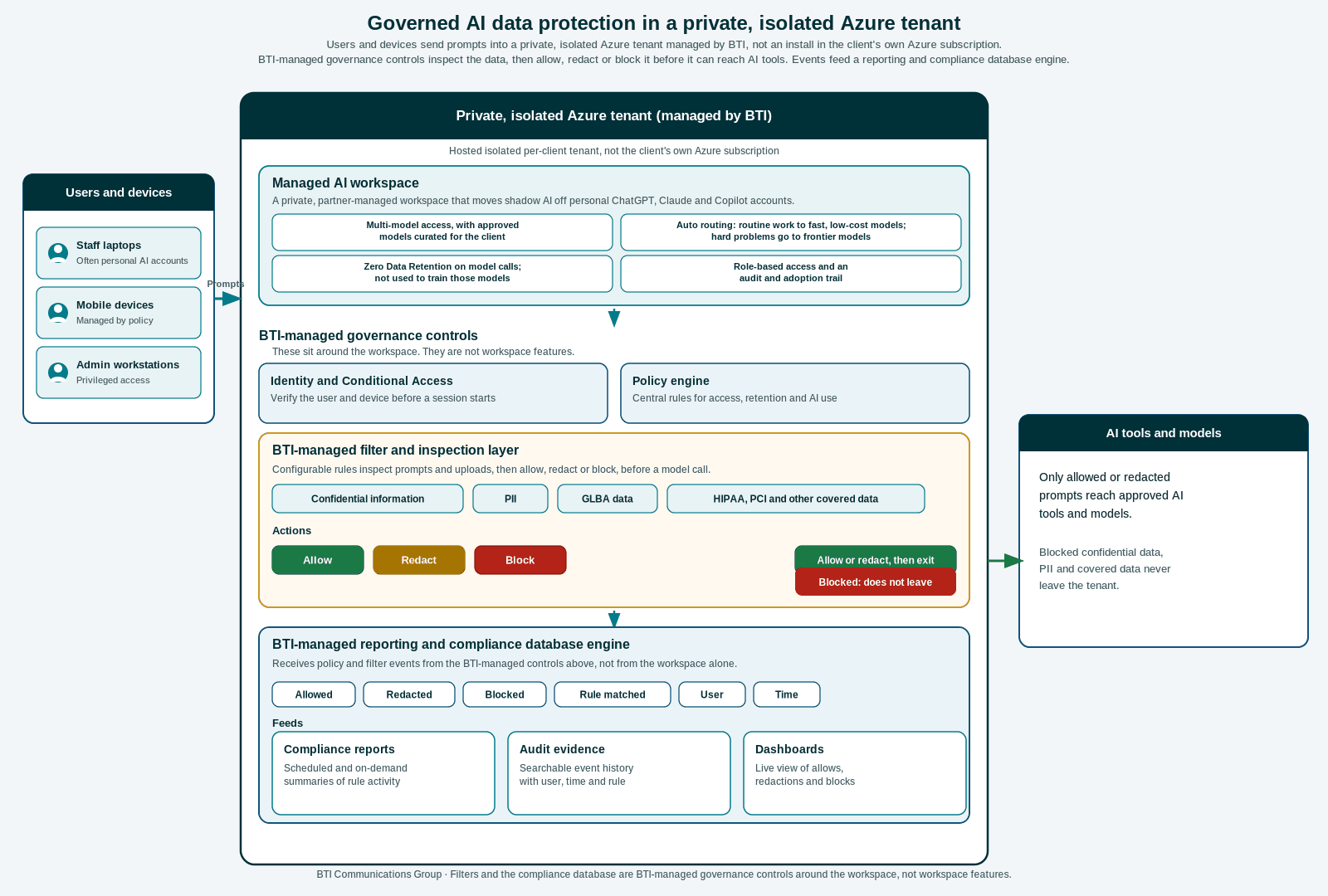
- AI data loss prevention is a BTI-managed control around the workspace, not a workspace feature. It watches prompts, uploads and web forms for sensitive data, such as customer, financial and health records, including text inside images, and helps stop it before it leaves.
- Discovery and policy limits show which AI tools and cloud apps staff actually use, then allow, limit or block them by policy instead of relying on each person’s settings.
- Logging and a BTI-managed reporting and compliance database engine record allowed, redacted and blocked events, including the rule matched, the user and the time, and feed compliance reports, audit evidence and dashboards. This engine is part of BTI’s governance layer, not a feature of the workspace.
- A private, partner-managed home for AI work. The managed AI workspace BTI deploys moves shadow AI off personal ChatGPT, Claude and Copilot accounts. Each BTI AI client gets its own hosted, isolated Azure tenant, managed by BTI. That tenant is not an install in the client’s own Azure subscription. The workspace gives teams multi-model access, role-based access, and an audit and adoption trail. Every model call runs with zero data retention at the model provider, and client data is not used to train those models.
The right answer is usually both: choose business-tier AI platforms with strong terms, then enforce your own policies with AI security and governance controls. A shadow AI and PII data governance assessment is a fast way to see where you stand. BTI can deliver this as part of our managed AI services and managed cybersecurity.
Cost-aware model routing: the AI equivalent of least-cost routing
Phone carriers have long used least-cost routing to send each call over the cheapest path that still meets quality standards. The same idea is coming to AI. Instead of sending every request to the most expensive frontier model, a routing layer picks among approved models based on the task.
Auto routing sends routine work to fast, low-cost models and hard problems to frontier models. The managed AI workspace BTI deploys works this way. Its automatic routing “selects among eligible models based on task requirements, availability, performance, and efficient use of the allowance,” stays within the models and providers each client permits, and runs with zero data retention at the model provider. It doesn’t guarantee the lowest consumption for every task, and no honest router should. But matching the model to the job (a quick summary doesn’t need the same model as a complex analysis) keeps AI spend predictable as usage grows. And because routing stays inside each client’s approved models and BTI-managed governance settings, cost control doesn’t come at the expense of data control. Learn more about AI cost reduction and automation and technology cost optimization.
Enterprise-grade governance, priced for small and mid-sized businesses
Most smaller and mid-sized companies assume the security and governance tools used by federal agencies, major financial institutions and global enterprises are out of reach. As part of a comprehensive solution, BTI delivers the same enterprise-grade governance tools used by Goldman Sachs, the U.S. Army, ExxonMobil and others, priced for small and mid-sized businesses, with co-managed support alongside your team or full management:
- Governed cybersecurity controls. Clear policies, documented reviews and auditable activity logs across users, devices and cloud apps.
- Protection level agreements for patching and maintenance. Defined schedules, explicit patch testing and whitelisting, pilot rollouts and post-patch verification, so fixes like this week’s vCenter, ESX and Expressway updates move quickly without treating your production systems as a test lab.
- Zero trust access. Identity-based verification for every user, device, application and AI agent, so one stolen login doesn’t open the whole network.
- Data loss protection and AI governance. Enforced policies for what data can reach AI tools and cloud apps, with the logs to prove it.
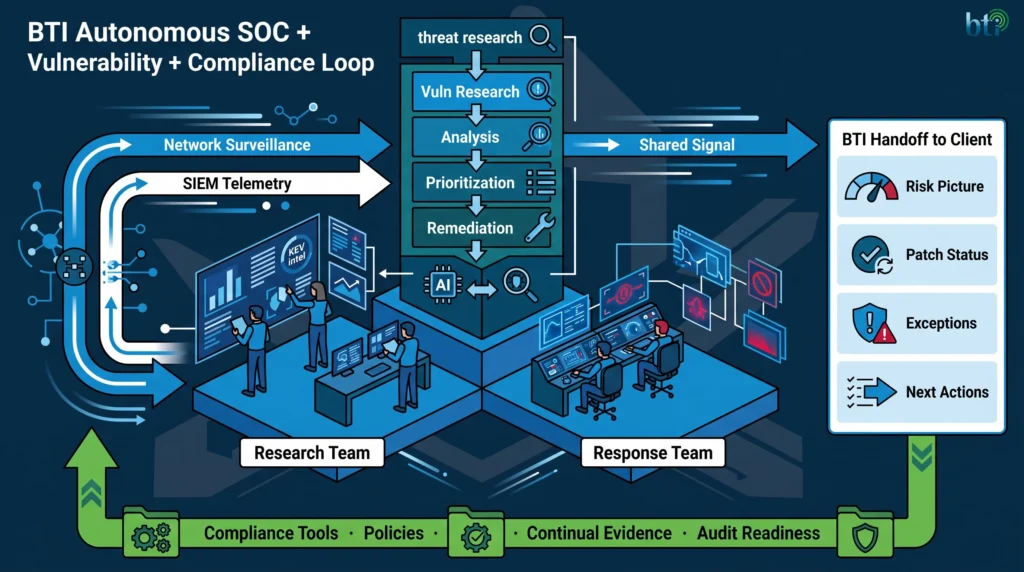
Client alerts are triaged in real time by best-in-class, enterprise-grade AI agents, then escalated to human engineers in our 24/7 NOC/SOC.
What your business should do
People
1. Expect targeted phishing. Exposed admin emails and tenant details make scams more convincing. Warn admins and finance staff, and verify unexpected requests by phone.
Ask your provider for: phishing training and a simple way to report suspicious messages.
2. Set an AI use policy. Say which AI tools are approved, which accounts to use, and what data never goes into a prompt.
Ask your provider for: an AI tool inventory and a policy your team can follow.
Tools
3. Lock down admin tools. Put vCenter, firewall management, remote support and identity consoles behind phishing-resistant MFA and allow access only from dedicated admin computers that aren’t used for email or browsing.
Ask your provider for: a list of every admin console, who can reach it and from where.
4. Enforce data controls, not just settings. Use AI data loss prevention and policy controls so protection doesn’t depend on each person’s toggles.
Ask your provider for: a report of what sensitive data tried to reach AI tools last month.
Processes
5. Patch fast, then verify. Patch everything on the list above, test first, pilot, then roll out with a rollback plan. After patching an exposed system, check whether it was compromised before the patch.
Ask your provider for: a documented change process and post-patch compromise checks.
6. Rotate secrets after any vendor incident. When a provider says secrets may have been exposed, replace keys and passwords where they were issued, then retire the old ones.
Ask your provider for: a list of where your API keys and service passwords live.
8 questions to ask your IT provider
- How do you protect your technicians’ computers and remote support tools?
- Is phishing-resistant MFA required on every admin account, including yours?
- Which of our systems run on VMware, and are vCenter, ESX and VMware Tools all patched?
- Who can reach our firewall management and vCenter, and from which computers?
- Which AI tools do our staff use, and which accounts do they use them with?
- What stops sensitive data from being pasted into an AI tool?
- Where are our API keys and service passwords stored, and when were they last rotated?
- After a critical patch, do you check for signs of compromise?
Missed last week? Read the November 20 AI and cybersecurity update.
Why BTI
BTI Communications Group has delivered IT, security and communications for over 40 years, since we were founded in Chicago in 1985. Today we have offices in Santa Fe Springs, Downers Grove and Phoenix. We deliver an AI-enabled a la carte, co-managed, or fully managed toolset customized for each client’s IT infrastructure and support capabilities. Every BTI support agreement includes SLAs with 4-hour onsite emergency response, with 24/7 system health and alert monitoring available, plus a 24/7 converged security NOC/SOC. From networks, cloud and AI to cybersecurity, data governance and connectivity, BTI designs, sells, installs and commissions it all.
Whatever is missing, whether it’s an unpatched vCenter, an exposed admin console or an AI tool with too much access, gets the same treatment: spot it, assess it, evaluate it, fix it.
Call our IT team: Los Angeles 323-510-8003, Chicago 312-492-2613, Phoenix 480-272-8728.
Want to know where your gaps are?
Frequently asked questions
Can I trust an AI platform’s terms of service to protect my business data?
They help, but they aren’t enough on their own. Business tiers from major vendors commit not to train on your data by default. Terms govern what the vendor does after data arrives, though. They don’t stop staff from pasting sensitive data, they don’t cover personal accounts, and they don’t make the vendor immune to breaches. Enforced data loss prevention and AI governance controls close those gaps.
What is AI data security?
AI data security means controlling what data reaches AI tools, who can use which tools and accounts, and how that activity is logged. It combines an AI use policy, approved business-tier tools, data loss prevention that checks prompts and uploads, and logs that show what controls were in place.
What is the difference between AI terms of service and AI governance tools?
Terms of service are the vendor’s promises about its own handling of your data. AI governance tools are controls you enforce: they discover which AI tools are in use, apply policy to every user and device, block sensitive data before it leaves, and keep audit logs.
Why are attackers targeting IT admin tools?
Remote support tools, firewall management servers, vCenter and identity consoles each control many other systems. One compromise can reach every computer, server or customer that tool manages, so they’re worth protecting more carefully than everyday computers.
What should I do after a vendor says my secrets may have been exposed?
Replace each key, token or password where it was originally issued, then retire the old one, and review logs for unusual access. Updating a value in one place doesn’t invalidate a credential that was already copied.
What is AI model routing?
Model routing sends each AI request to an approved model that fits the task, instead of sending everything to the most expensive model. Auto routing sends routine work to fast, low-cost models and hard problems to frontier models. That keeps costs more predictable while staying inside your approved models and data rules, but it doesn’t guarantee the lowest consumption for every task.
When did Anthropic go public?
Anthropic priced its IPO at $83 per share on November 18, 2026, and its shares began trading on the Nasdaq Global Select Market on November 19, 2026 under the symbol “ANT.”
Should Fortinet products be patched on a weekly cadence?
Yes, at the moment they should. Between October 1 and November 24, 2026, Fortinet published new advisories in multiple waves, including a large set on November 10 covering FortiOS, FortiManager, FortiAnalyzer and FortiMail. CISA added two Fortinet vulnerabilities to its exploited list in October, and Fortinet confirmed the FortiMail path traversal (CVE-2026-104286) has been exploited in the wild. Keep management interfaces off the internet, apply the fixed releases in each advisory, and check for signs of compromise on anything that was exposed before it was patched.