By Tony Dvorzsak, Director of Converged Security & Technologies, BTI Communications Group
Most employees already carry a badge for the front door. Then they sit down and type a password, approve a phone prompt, or hunt for a six-digit code to get into Windows and their apps. That leaves employees with another credential to manage, run by a different team.
HID Crescendo 4000 cards are designed to close that gap. A properly specified HID Crescendo card can carry your door credential and a FIDO2 passkey on the same badge. On supported systems, employees use their Crescendo badge and FIDO2 PIN to sign in without typing an account password. Windows support depends on the identity platform and configuration. Here is how HID Crescendo passwordless login works, and what to check before you order. For the bigger picture, see our earlier post on HID Converged Credentials.
What HID Crescendo 4000 adds to a badge
Crescendo is HID’s family of smart cards and security keys for strong authentication. Depending on how they are ordered, HID Crescendo cards can combine:
- Digital access: FIDO2 passkeys, PIV-compatible certificate authentication, and OATH one-time passwords.
- Physical access: Seos, iCLASS, MIFARE DESFire, MIFARE Classic, and HID Prox.
Cards come in contactless and dual-interface (contact plus contactless) versions. For people who don’t need a door credential, the HID Crescendo Key V3 offers FIDO2 sign-in in a USB/NFC key.
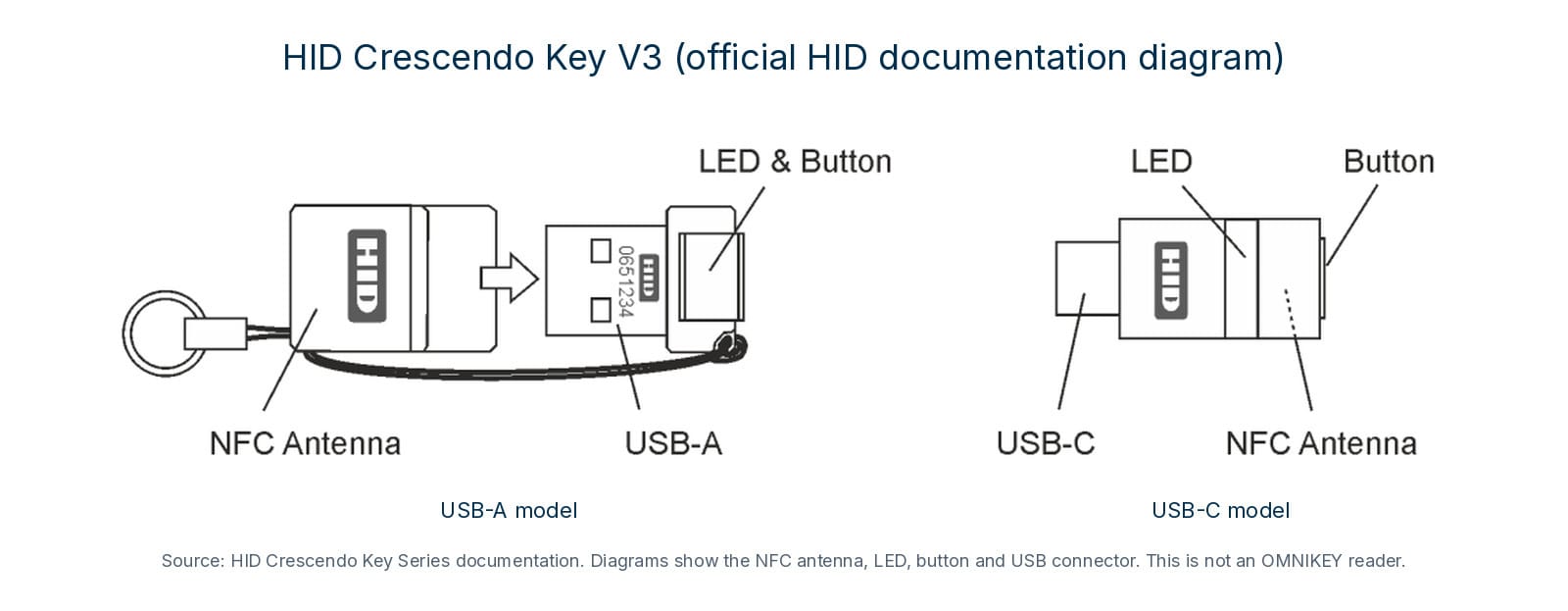
Features and certifications vary by model. HID sells Crescendo 4000, 4000 FIDO, and 4000 FIPS variants, and they aren’t interchangeable. If you need FIPS 140-3 validation or a specific FIDO certification level, specify the variant that carries it and confirm it against the certificate. BTI supplies, installs and supports the complete HID Crescendo line, and we help you specify the right card before a large order.
How a tap and a PIN replace typing a password
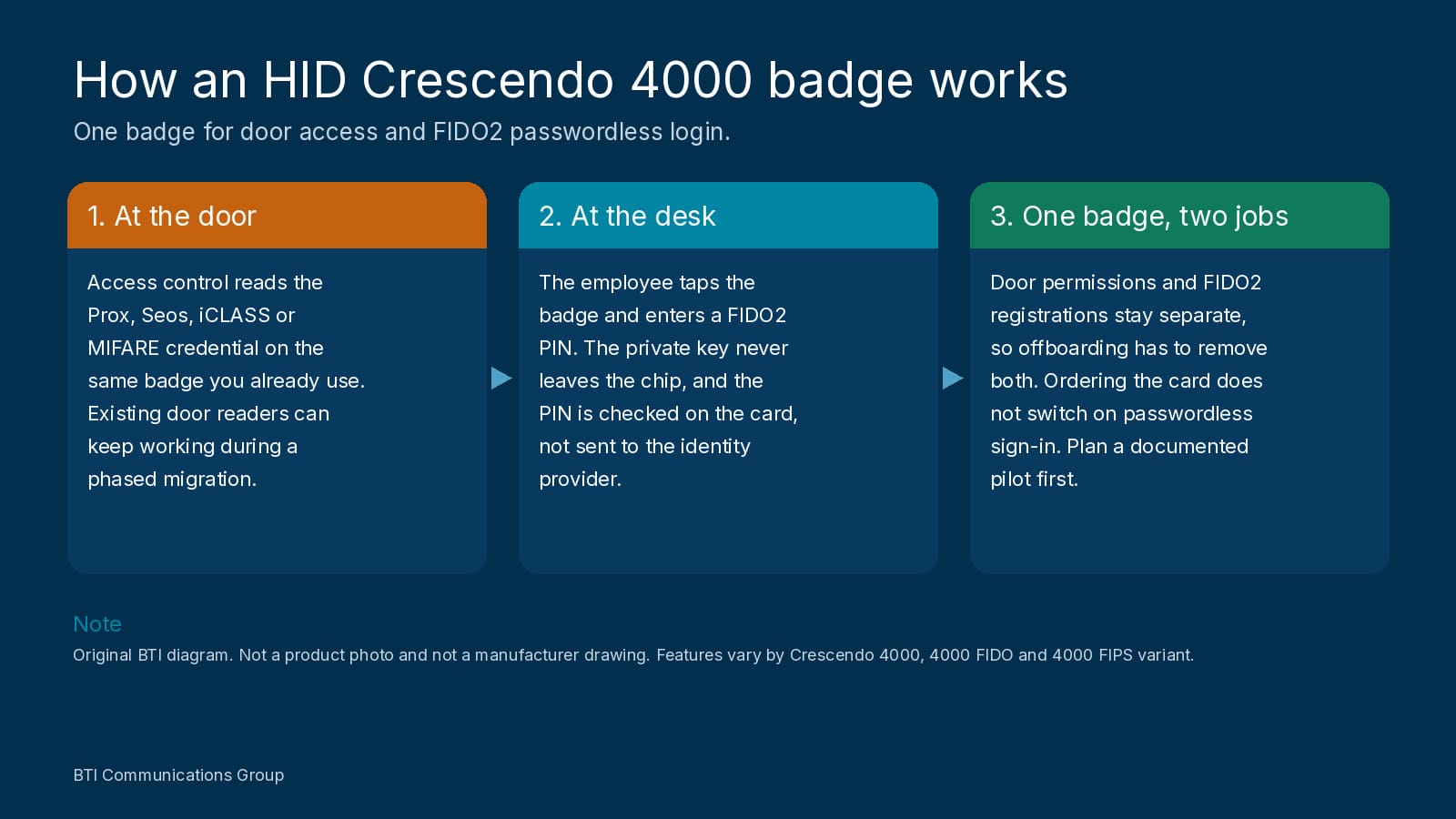
An OMNIKEY 5023 desktop reader plugs into the PC by USB and talks to the card over 13.56 MHz NFC. HID’s 5023 datasheet lists support for FIDO2 NFC authenticators, including Crescendo cards and keys, and the reader uses the standard driver built into Windows.
At sign-in, your identity provider sends a one-time challenge. The employee taps the badge and enters a PIN, and the card signs the challenge with a private key that never leaves the chip. The PIN is verified by the card itself and isn’t sent to the identity provider. The result is possession-plus-knowledge authentication that is phishing-resistant, because the passkey is tied to the real site and won’t work on a lookalike login page.
This FIDO2 flow is not the same as classic Windows smart card sign-in, which uses certificates and Active Directory. Both can be valid designs. If your goal is passwordless login with an HID Crescendo 4000 badge, plan around FIDO2 and your identity platform, not the older certificate-only logon path.
Door access and desktop sign-in on one Crescendo card
A Crescendo badge holds multiple credentials that work independently. At the door, your access control system reads the Prox or Seos credential as it does today. At the desk, the reader uses the card’s FIDO2 side. (The OMNIKEY 5023 is a high-frequency reader, so it doesn’t read 125 kHz Prox, and it doesn’t need to.) If you are planning a reader upgrade as well, see our earlier overview of HID card readers.
That makes phased migrations practical. HID has described a global rollout where cards carried both Prox and Seos so existing door readers kept working while FIDO2 was planned for later. Two cautions from that same experience:
- One badge doesn’t mean one admin system. Door permissions and FIDO2 registrations are managed separately, so offboarding has to remove both.
- Ordering Crescendo doesn’t switch on passwordless sign-in. HID notes FIDO2 needs its own phase: enrollment, identity provider integration, and lifecycle planning.
This is a converged security project: the badge is shared, but facilities, IT and HR still have to work from the same issuance and removal process.
Where Microsoft Entra ID fits
Browser and app sign-in. Microsoft supports Entra passkey sign-in in Edge, Chrome, and Firefox on Windows, and Microsoft’s list of FIDO2 keys eligible for Entra ID includes Crescendo 4000 models as NFC authenticators.
Windows sign-in. According to Microsoft’s Windows security key deployment guide, the PC must run a supported Windows version and be Microsoft Entra joined or hybrid joined. IT must enable the passkey (FIDO2) policy in Entra and turn on security-key sign-in for Windows. Hybrid environments also need Microsoft Entra Kerberos set up for on-premises Active Directory. Devices joined only to on-premises Active Directory aren’t supported, nor are server sign-in or “Run as.”
BTI’s identity, MFA and device security work is built around Microsoft Entra ID, so a Crescendo pilot can be planned alongside the MFA and Conditional Access policies you already use.
Where Okta fits
Browser and app sign-in. Okta supports FIDO2 security keys through its Passkey (FIDO2 WebAuthn) authenticator, and admins can allow specific Crescendo models.
Windows sign-in. Okta’s Desktop MFA for Windows supports FIDO2 security keys, but only online. Standard Desktop MFA adds the key as a second factor after the Windows password. Okta’s separate Desktop Password Autofill feature (off by default) can let users skip typing the password after an initial password-plus-factor sign-in, using a FIDO2 key with a PIN. It’s a passwordless experience: the Windows password still exists and remains the fallback if the PC is offline or autofill fails.
Okta’s instructions describe a USB security key. We haven’t found official confirmation that a contactless Crescendo card on an OMNIKEY reader works at the Okta Windows sign-in screen, and we haven’t seen anything saying it doesn’t. If that’s your goal, confirm it with Okta and HID and prove it in a pilot.
Where an HID Crescendo badge makes sense
- Shared workstations in clinics, labs, and production floors, where people rotate between computers and personal phones are restricted. Confirm that clinical and line-of-business apps accept the same sign-in. For the door side in clinical spaces, see our notes on access control for medical offices.
- Warehouses and manufacturing, where reader placement, PIN entry, and shift changes need testing. See warehouse access control and manufacturing access control for how badge rules already work on those floors.
- Regulated and high-risk roles, such as finance, IT admins, and contractors, where a company-issued hardware credential with a clear issue-and-return process matters.
What a successful Crescendo deployment requires
- A complete card specification: door technology, card format, facility codes, and approved credential encoding and encryption keys, plus FIDO2, certificates, or OATH as needed.
- Required PIN (user verification): set your identity provider to require it. Some platforms allow keys without a PIN, which would make the card a single factor.
- Readers at each workstation, tested on your Windows builds.
- Enrollment and recovery: who verifies identity before a card is registered, and what happens when one is lost. HID recommends a backup authenticator, because each FIDO credential is unique and can’t be copied.
- Session behavior: don’t assume removing a card locks the PC. Test lock, sign-out, and user switching.
- Coordinated onboarding and offboarding across facilities, HR, and IT.
Why BTI for HID Crescendo
BTI is a converged physical and IT security integrator, so a Crescendo project is not split between a door vendor and a separate identity vendor.
- We supply, install and support the complete HID Crescendo line, including Crescendo 4000, 4000 FIDO, 4000 FIPS and Crescendo Key, and we specify the variant against the certifications you actually need.
- The same team handles door access control, cybersecurity and Microsoft Entra ID or Okta integration, including card encoding, reader placement and sign-in policy.
- We start with a small, documented pilot covering issuance, door access, sign-in, PIN lockout, lost cards and offboarding, so you have real results before a large badge order. For Okta Windows sign-in in particular, we treat contactless reader support as something to confirm in that pilot.
- Onboarding and offboarding are planned across facilities, HR and IT, so a departing employee loses door access and FIDO2 registration together.
- We support this work from our offices in Downers Grove, Illinois; Santa Fe Springs, California; and Phoenix, Arizona, and we have been in business for over 40 years.