If your nonprofit or church has used Microsoft 365 for a few years, there is a good chance the licenses you started with are not the ones you have today. In 2025 Microsoft ended its free Microsoft 365 Business Premium grant for nonprofits. Many organizations found out when the renewal date passed and users landed on a different plan, or on no plan at all.
This post explains what Microsoft offers nonprofits now, who qualifies, including churches and faith-based organizations, and how to set up licensing so it stays within Microsoft’s rules. Every fact comes from Microsoft’s own nonprofit pages, linked at the end.
Who qualifies
Microsoft’s nonprofit offers are for organizations with recognized charitable status in their country. In the United States, Microsoft gives 501(c)(3) as the example. Public libraries, public museums and certain rural hospitals are also eligible.
Churches and faith-based organizations. Microsoft’s U.S. criteria do not exclude religious organizations. A church, ministry or faith-based nonprofit with recognized 501(c)(3) status meets the stated criteria. Microsoft confirms eligibility through its own validation process when you register, and it can ask for documents.
Who does not qualify. Regardless of nonprofit status, Microsoft excludes hospitals and health systems (except certain rural facilities), government agencies, schools, colleges and universities (including nonprofit schools), financial institutions, professional and trade associations, professional sports organizations, political, labor and fraternal organizations, and nonprofits focused on influencing public policy. If your church runs a school, the school side uses Microsoft 365 Education licensing, which is also changing. See our Microsoft 365 Education guide.
What changed in 2025
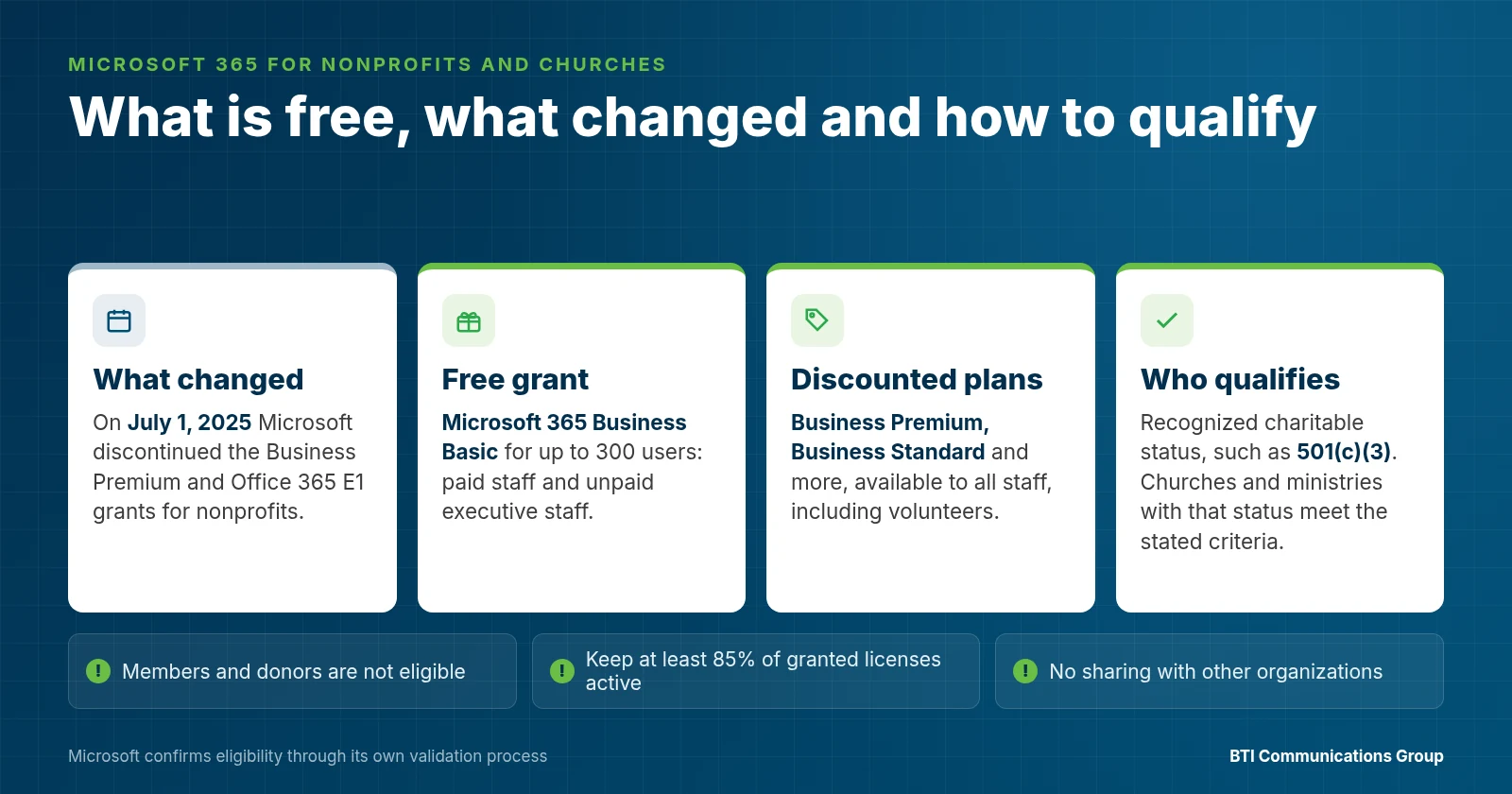
On July 1, 2025, Microsoft discontinued the Microsoft 365 Business Premium grant and the Office 365 E1 grant for nonprofits. Microsoft announced the change on May 14, 2025. Each organization’s free licenses ended at its first renewal on or after July 1, 2025 and did not renew.
What Microsoft offers instead:
- Up to 300 granted licenses of Microsoft 365 Business Basic.
- Discounts of up to 75% on many Microsoft 365 offers for nonprofits, including Business Premium and Business Standard.
Microsoft’s guidance is that license moves are done manually in the Microsoft 365 admin center, and that users should be moved before the old subscription is cancelled to avoid disruption and data loss. If your renewal has already passed, check that every staff member has a working license and that nothing was lost in the change.
What is free, and what costs money
Free: Microsoft 365 Business Basic. Up to 300 users get web and mobile versions of Outlook, Teams, Word, Excel and PowerPoint, Copilot Chat, essential security features and 1 TB of cloud storage each. For many small churches and nonprofits, that covers email, documents and meetings.
Discounted: Business Premium and more. Business Premium adds the desktop apps and the stronger security and device management that most organizations need once they handle donor data, payroll or online giving. Microsoft also discounts Business Standard, Microsoft 365 E3 and E5, Microsoft 365 Copilot, and security add-ons such as Defender, Purview, Entra and Intune. Current prices are on Microsoft’s nonprofit offers page.
Azure credits. Eligible nonprofits can use $2,000 in Azure service credits per year. It is a credit, not cash, unused credit does not roll over, and it renews each year while you stay eligible.
Dynamics 365 and Power Platform. Microsoft discounts Dynamics 365 apps for donor, volunteer and finance work, and offers Power Apps free for up to 10 users.
The rules that trip organizations up
Granted licenses are for paid staff and leaders. Free licenses are for paid employees and unpaid executive staff, such as board members, officers and executive directors.
Volunteers use discounted licenses. Discounted plans can go to all staff, including volunteers and temporary staff.
Members and donors are not eligible. Microsoft says beneficiaries, donors and members, such as members of a church, cannot use nonprofit licenses. Giving every ministry leader or small group host a license usually breaks this rule.
Unused grants count against you. Microsoft expects nonprofits to keep at least 85% of granted assigned licenses in active use. Organizations that fall below that risk losing future grants.
No sharing. Nonprofit licenses cannot be shared with, transferred to or resold to other organizations, even related ones.
A quick checklist for nonprofits and churches
- Confirm your organization’s eligibility in Microsoft’s nonprofit portal.
- List every user and mark them paid staff, unpaid executive staff or volunteer.
- Put paid staff and leaders on Business Basic grants, or on discounted Business Premium where they handle sensitive data.
- Put volunteers who need accounts on discounted plans, and remove accounts for people who are no longer active.
- Check that the expired Business Premium or E1 grant did not leave users without a license or mailbox.
- Turn on MFA for everyone, and protect finance and leadership mailboxes against impersonation.
- Decide whether the annual Azure credit should cover backup, file storage or an app.
- Review license use every quarter to stay above Microsoft’s 85% usage rule.
Questions to ask your IT provider
- Which of our users are on granted licenses, and are they all eligible for them?
- What happened to our Business Premium or E1 grant at renewal?
- Which staff should move to discounted Business Premium for security?
- How will you protect our finance and pastor or director mailboxes from impersonation?
- Can our volunteers get accounts without breaking Microsoft’s rules?
- Who supports us after hours and on weekends, when services and events happen?
How BTI helps
BTI helps nonprofits, churches and faith-based organizations prepare their Microsoft registration, and sells and manages Microsoft 365 licensing through Microsoft’s Cloud Solution Provider (CSP) program. We sort users into granted and discounted licenses, move users off expired grants without losing mail or files, migrate from Google Workspace or other systems, and secure the tenant with a 24/7 NOC/SOC. Microsoft makes the eligibility decision; we make the rest simple.
BTI offers fully managed, co-managed and month-to-month managed IT from offices in Santa Fe Springs, Downers Grove and Phoenix, and every support agreement includes SLAs with 4-hour onsite emergency response. BTI has been in business for over 40 years.
See Microsoft 365 for nonprofits and churches, BTI’s Microsoft services and technology for nonprofits and churches.
Not sure what you qualify for?
Sources
- Microsoft Nonprofits, eligibility: https://www.microsoft.com/en-us/nonprofits/eligibility
- Microsoft Nonprofits, offers: https://www.microsoft.com/en-us/nonprofits/offers-for-nonprofits
- Microsoft Nonprofits, FAQ: https://www.microsoft.com/en-us/nonprofits/faq
- Microsoft Nonprofits, Azure: https://www.microsoft.com/en-us/nonprofits/azure
- Microsoft Learn, Microsoft for Nonprofits updates: https://learn.microsoft.com/en-us/industry/nonprofit/microsoft-for-nonprofits/updates
- Microsoft Tech Community, grant discontinuation announcement, May 14, 2025: https://techcommunity.microsoft.com/discussions/nonprofitpartners/announcement-microsoft-365-business-premium–office-365-e1-grant-discontinuation/4415334
Related BTI reading: nonprofit and church cybersecurity, governed AI for nonprofits, IT services for nonprofits and churches.