If your one or two person IT team is buried in tickets, the usual next step is to post a job for another IT person. Sometimes that is the right call. Often, though, the problem is not headcount. It is coverage: nights, weekends, vacations, security alerts and skills no single hire can carry. Co-managed IT keeps your internal IT staff in charge and adds a managed IT partner behind them for the work they cannot cover.
This guide is written for companies with roughly 50 to 150 employees and 1 to 3 internal IT staff. It walks through what another hire really costs (using public U.S. Bureau of Labor Statistics data, not guesses), where a hire still leaves gaps, when hiring is honestly the better choice, and how to split the work if you go co-managed.
The short answer: hire when you need more hands in the building every day and the work is mostly on site and specific to your business. Choose co-managed IT when the gap is after-hours coverage, security monitoring, specialist skills or a single point of failure. Many growing companies do both: keep or hire one strong internal IT lead, and back that person with a co-managed partner.
What co-managed IT is, and what it is not
Co-managed IT is a shared model. Your internal IT person or team keeps ownership of your business systems, priorities and day to day decisions. A managed IT provider adds the tools, people and round the clock coverage that a small team cannot staff on its own. Both sides work from the same ticket queue, documentation and escalation rules.
It is not the same as fully managed IT, where the provider runs everything and you may have no internal IT at all. If you are weighing those two models, our post on co-managed IT vs managed IT and the fully managed vs co-managed comparison cover the differences. This post is about a narrower decision: you already have IT staff, and you are deciding whether the next dollar goes to a new hire or to a co-managed partner.
It is also not a plan to replace your IT staff. A good co-managed arrangement makes your internal people more valuable, because it takes the noise off their plate so they can work on projects leadership actually cares about. For more on that side of it, see how co-managed IT reduces internal IT burnout.
What another IT hire really costs
Salary is only part of the cost of an employee. The Bureau of Labor Statistics (BLS) reports that for full-time private industry workers in June 2026, wages and salaries were 68.5 percent of total employer compensation costs, and benefits were the other 31.5 percent (BLS Employer Costs for Employee Compensation). That is an all-occupation average, but it is a fair way to estimate what a salary turns into once health coverage, paid leave, payroll taxes and retirement contributions are added.
The table below uses BLS median annual wages from May 2025 for three common IT roles, then divides by 68.5 percent to estimate the total yearly cost to the employer. Figures are rounded.
Median annual wage (BLS, May 2025) and estimated total employer cost
| Role | Los Angeles area | Chicago area | Phoenix area |
|---|---|---|---|
| Computer user support specialist (help desk) | $75,070 wage about $110,000 total | $60,730 wage about $89,000 total | $62,310 wage about $91,000 total |
| Network and computer systems administrator | $106,290 wage about $155,000 total | $103,170 wage about $151,000 total | $93,730 wage about $137,000 total |
| Information security analyst | $129,630 wage about $189,000 total | $125,310 wage about $183,000 total | $130,360 wage about $190,000 total |
Wages: BLS Occupational Employment and Wage Statistics, May 2025, metro areas Los Angeles-Long Beach-Anaheim, Chicago-Naperville-Elgin and Phoenix-Mesa-Chandler. Total cost is the median wage divided by 0.685, based on the BLS benefit share for full-time private industry workers. Medians mean half of workers earn more; experienced hires usually cost more than the median.
And the table still leaves out costs that show up in the first year:
- Recruiting and ramp up. Time spent writing the job post, interviewing and onboarding, plus the months before a new person knows your systems well.
- Tools. A new admin needs the same monitoring, backup, endpoint security, patching and documentation tools a provider already runs. Those are licensed per device or per user whether one person uses them or fifty.
- Training and certifications. Skills in security, cloud and networking go stale fast, and keeping them current takes paid time.
- Turnover. If the person leaves, you pay to hire again, and the knowledge in their head may leave with them.
None of this means a hire is a bad idea. It means the honest comparison is total cost and total coverage, not salary versus a monthly invoice.
The coverage gap a single hire cannot close
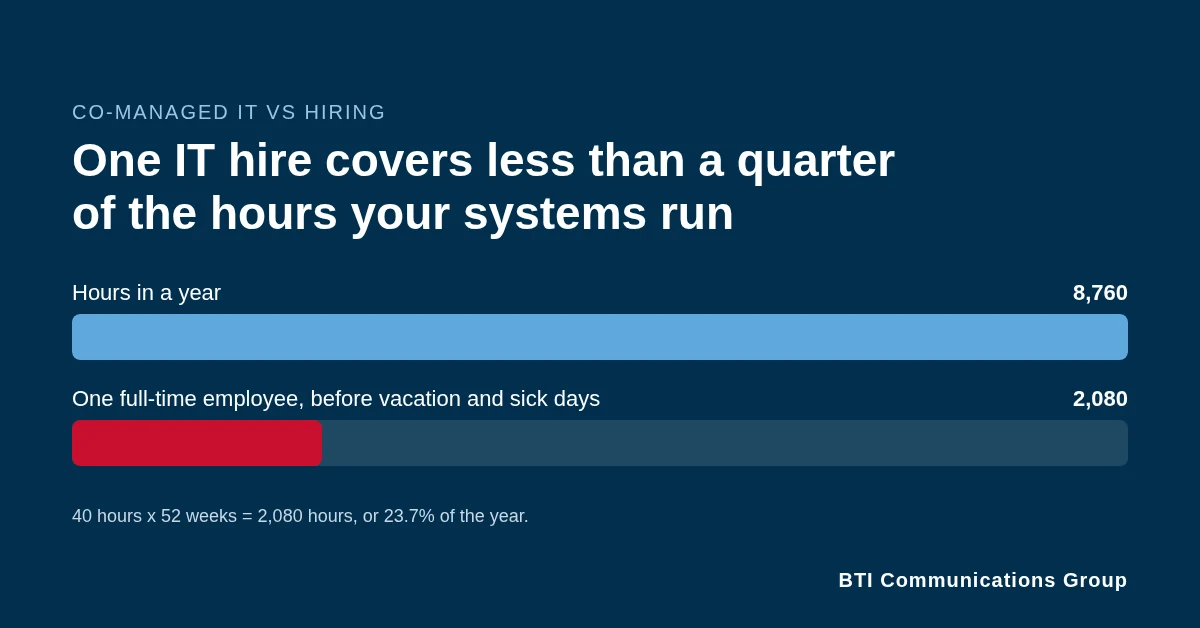
A full-time employee works about 2,080 hours a year (40 hours times 52 weeks). There are 8,760 hours in a year. Even before vacation, holidays and sick days, one person covers less than a quarter of the hours your servers, firewalls, cloud accounts and email are running. Problems do not wait for business hours, and neither do attackers.
Hours are only one gap. A 50 to 150 person company usually needs all of these, and they rarely live in one person:
- Help desk for passwords, laptops, printers and Microsoft 365 questions.
- Systems and network administration for servers, switches, firewalls, Wi-Fi and backups.
- Security operations: watching alerts, investigating suspicious sign-ins, patching on time and responding when something gets through.
- Planning: budgets, refresh cycles, vendor management and the security roadmap that insurers and auditors ask about, which is where a vCISO often fits.
Hiring a second generalist adds hours, but it still leaves you without a security team watching overnight, without backup when both people are out, and without specialists when a project needs them. That is the gap co-managed IT is built for. At BTI, a staffed help desk and engineers are backed by a 24/7 NOC/SOC that monitors systems around the clock, with 10,000+ alerts handled and zero missed. Your IT lead decides what gets escalated to them and what stays in house. See how that works on our co-managed IT and security operations page.
When hiring is the better call
A co-managed provider is not always the answer. Hiring is usually the right move when:
- Most of the work is physical and on site. If your day is full of desk moves, conference room setups, shop floor devices and hands-on hardware, you need a person in the building.
- Your systems are unusual. Custom line of business software, specialized equipment or deep process knowledge can make an internal person far more effective than any outside team.
- The volume is steady and predictable. If you have a full workload for another person during business hours, and after-hours risk is already covered, a hire can be the most cost effective way to add capacity.
- You need an owner, not more help. If nobody internal owns IT decisions today, hire or promote an IT lead first. Co-managed works best when someone on your side is accountable.
If several of those describe you, hire. Then ask whether that new person will also be on call every night and every holiday. If the answer is no, you still have a coverage gap to solve.
Hire, co-manage, or both: a side by side view
| Question | Hire another IT person | Co-managed IT | Both together |
|---|---|---|---|
| On site, in person help | Strong during their hours | Scheduled or on request | Strong |
| Nights, weekends, holidays | Only with an on-call plan | Covered by the provider’s 24/7 team | Covered |
| Vacation and turnover risk | High with 1 to 2 people | Low, a team shares the work | Low |
| Security monitoring | Limited to what one person can watch | 24/7 NOC/SOC | 24/7 NOC/SOC with internal context |
| Specialist skills | Limited to the person you hire | A bench of engineers | A bench plus your own expert |
| Knowledge of your business | Deep over time | Grows with documentation | Deep |
| Cost shape | Salary, benefits, tools, training | A defined monthly scope | One salary plus a defined scope |
The hybrid model most growing companies land on
For many 50 to 150 person companies, the strongest setup is one capable internal IT lead backed by a co-managed partner. The internal lead owns priorities, users, vendors and the business knowledge. The partner handles the volume and the hours: overflow tickets, monitoring, patching, backups, security alerts and the projects that need extra hands.
If you already have two or three IT staff, co-managed IT often means they stop trading on-call weeks and start finishing projects. If you have one IT person, it means that person can finally take a vacation without the business holding its breath. If you need temporary people rather than a service, for example during a leave or a big project, ask about IT staff augmentation, where engineers work under your IT lead’s direction.
How to split the work: a simple responsibility table
Most co-managed problems come from fuzzy lines. Agree on who does what before day one. Here is a starting point many teams use, written in plain terms: Owns means accountable for the outcome, Does means does the hands-on work, Informed means kept in the loop.
| Area | Your internal IT | Co-managed partner |
|---|---|---|
| IT priorities and budget | Owns | Advises |
| Business hours help desk | Owns, does local and VIP requests | Does overflow and remote tickets |
| After-hours and weekend support | Informed | Owns and does |
| Security alert monitoring and response | Informed, approves major actions | Owns and does through the 24/7 NOC/SOC |
| Patching and updates | Approves schedule and exceptions | Does and reports |
| Backups and restore testing | Owns the recovery plan | Does monitoring and test restores |
| Line of business applications | Owns and does | Supports when asked |
| Network, firewall and Wi-Fi changes | Approves | Does, documents |
| New hires and offboarding | Owns the request | Does accounts and devices |
| Admin credentials and documentation | Owns, keeps full access | Does updates in a shared system |
The last row matters more than it looks. Your company should always own its admin accounts, domains and documentation, so you are never locked in. For a deeper version of this table, including security and compliance layers, see the co-managed IT shared responsibility model.
Why some co-managed setups fail, and how to avoid it
Ask IT managers about co-managed IT and you will hear real concerns: the provider wants to replace the internal team, tools are not shared, and during an outage each side points at the other. Those failures are real, and they are avoidable.
- Write down the split. Use a table like the one above, and review it every quarter.
- Share one system. One ticket queue and one documentation system, visible to both sides.
- Keep your keys. Your team keeps full admin access. The partner gets the access its scope needs, and every account is named and logged.
- Agree on escalation. Who gets called at 2 a.m., what they can do without asking, and what needs approval.
- Measure it. Monthly reporting on tickets, response times, patch status and security alerts, reviewed together.
Questions to ask a co-managed IT provider
- Will you work under our IT lead’s priorities, or will you push to replace our team?
- Which tasks do you own, which do we own, and can we see that in writing before we sign?
- Who watches alerts at night and on weekends, and is that your own NOC/SOC?
- Will our IT staff have full access to the tools, tickets and documentation you use in our environment?
- Who owns our admin accounts, domains and documentation if we part ways?
- What are your response times by priority, and how do you report on them?
- Can you send someone on site, and how fast in an emergency?
- How do you handle patching windows and changes that could interrupt our business?
- What does the first 30 days look like?
- Is pricing itemized so we pay only for the scope we use?
BTI answers these in writing before any agreement. On site help is available from our Los Angeles, Chicago and Phoenix offices, and 4-hour onsite emergency response is available under BTI support agreements. If you are already working with a provider that is not meeting these standards, our guide to switching IT providers explains how to change without downtime.
How to decide in one week
- Pull 90 days of tickets. Sort them into on site, remote, after hours and security. That shows where the hours go.
- List the gaps. Nights and weekends, vacations, security monitoring, specialist projects and documentation.
- Price the hire honestly. Use the BLS table above for your metro, then add tools, training and recruiting.
- Price the co-managed scope. Ask for an itemized quote that covers only your gaps. Our managed IT pricing page shows how BTI itemizes, and the co-managed IT cost and risk comparison lays out the three models side by side.
- Compare coverage, not just cost. Which option covers the most of your 8,760 hours and your biggest risk?
Co-managed IT near you
BTI supports internal IT teams from offices in Los Angeles, Chicago and Phoenix. Start with your region:
Southern California
Chicagoland
Or see the national co-managed IT services page.
Not sure whether to hire or co-manage?
Talk with a BTI engineer about your ticket load, your coverage gaps and your budget. You will get a straight answer, even if that answer is to hire.
Call the BTI IT team: Los Angeles 323-510-8003, Chicago 312-492-2613, Phoenix 480-272-8728, or toll-free 800-435-7284 (800-HELP-BTI).
Frequently asked questions
What is co-managed IT?
Co-managed IT is a shared support model. Your internal IT staff keep ownership of priorities and business systems, and a managed IT provider adds help desk overflow, after-hours coverage, security monitoring, patching and specialist engineers. Both sides work from the same tickets, documentation and escalation rules.
Is co-managed IT cheaper than hiring another IT person?
Often, but not always. Using BLS data, a network and computer systems administrator in the Los Angeles area has a median wage of $106,290, or about $155,000 a year once benefits are added, before tools, training and recruiting. Compare that total with an itemized co-managed scope that covers only your gaps, and weigh the coverage each option gives you.
When should we hire instead of using co-managed IT?
Hire when most of the work is on site and hands-on, when your systems are unusual enough that deep internal knowledge matters most, when there is a steady full-time workload during business hours, or when nobody internal owns IT decisions yet. Co-managed IT works best when someone on your side is accountable.
Will a co-managed provider replace our IT staff?
It should not. A good co-managed partner works under your IT lead's priorities and takes routine and after-hours work off their plate so they can focus on projects. Ask any provider to put the split of responsibilities in writing before you sign.
How do we split responsibilities with a co-managed IT partner?
Write a simple responsibility table. Your team usually owns priorities, budget, line of business applications and local requests. The partner usually handles after-hours support, security alert monitoring, patching, backup monitoring and overflow tickets. Review the table every quarter.
Does co-managed IT include 24/7 security monitoring?
It can, and it should be spelled out in the scope. At BTI, co-managed clients are backed by a 24/7 NOC/SOC that monitors systems around the clock, with 10,000+ alerts handled and zero missed. Your IT lead decides what gets escalated.
Who keeps the admin passwords in a co-managed setup?
Your company should. Your internal team keeps full admin access to accounts, domains and documentation. The partner gets the named, logged access its scope requires, so you are never locked in if you change providers.
Sources: U.S. Bureau of Labor Statistics, Occupational Employment and Wage Statistics, May 2025 (median annual wages for occupations 15-1232, 15-1244 and 15-1212 in the Los Angeles, Chicago and Phoenix metro areas); U.S. Bureau of Labor Statistics, Employer Costs for Employee Compensation, June 2026 (released September 9, 2026).