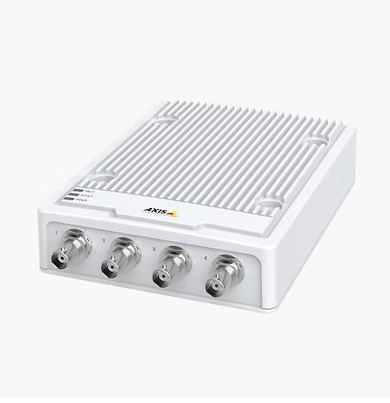
An Axis video encoder is a small network device that converts the signal from analog (coax) security cameras into digital IP video. It lets you keep working analog cameras and cabling while recording, viewing, and analyzing that video in a modern video management system (VMS). For businesses with dozens of legacy cameras, it is usually the fastest, lowest-cost path to IP surveillance.
Below we explain what an Axis video encoder is, how it works step by step, which Axis encoder models are current in 2026, when an encoder makes sense versus replacing cameras, and what to plan for during installation.
What Is an Axis Video Encoder?
An Axis video encoder is the bridge between an analog camera system and a network video system. Each encoder contains an encoding chip, a processor, and an embedded operating system (AXIS OS). Analog video comes in over coax; compressed digital video goes out over your Ethernet network to a VMS, a server, or the cloud.
Once converted, the stream behaves like video from an IP camera. You can view it live on a computer, tablet, or phone, search recordings, and apply analytics, without pulling new cable to every camera location.
Why Businesses Use Video Encoders: Making the Switch Without Re-Cabling
IP video delivers clear advantages: better image handling, easier scaling, event management, video analytics, and lower long-term cost of ownership. The obstacle is usually the cabling. In a large or occupied building, pulling new Cat6 to every camera can cost more than the cameras themselves and disrupt operations.
An encoder removes that obstacle. Instead of replacing your whole infrastructure at once, you convert the analog cameras you already own and migrate to IP cameras at your own pace, starting with the views that matter most.
- Protects existing investment: working analog cameras and coax runs stay in service.
- Retires the DVR: recording moves to a patched server, VMS, or cloud platform.
- Enables a phased budget: replace cameras over several budget cycles instead of all at once.
- One system to manage: analog and IP cameras appear side by side in the same VMS.
How Do Video Encoders Work?
The process is straightforward:
- Capture: the analog camera sends a composite video signal over coax to the encoder’s BNC input.
- Digitize and compress: the encoder converts the signal to digital video and compresses it with H.264 or H.265. Axis Zipstream further reduces bandwidth and storage.
- Stream: the encoder sends the video over the IP network, identical in format to a network camera stream.
- Record and manage: a VMS such as AXIS Camera Station or Milestone XProtect records the stream, applies motion or tampering events, and makes it available to authorized users locally or remotely.
Encoders also pass PTZ (pan-tilt-zoom) commands back to analog PTZ cameras, so operators can control them from the VMS. Many models support audio and alarm inputs/outputs for door contacts, sirens, or lighting.
What Are the Types of Axis Video Encoders?
Axis has historically offered two encoder formats. Here is how they compare today.
1. Standalone Video Encoders
Standalone encoders are the most common choice. They are compact boxes with 4 or 16 channels, mounted near the analog cameras or in the telecom room where coax terminates. Current Axis families include:
| Series | Channels | Best for |
|---|---|---|
| AXIS M71 (M7104, M7116) | 4 or 16 | Cost-effective conversion of standard-resolution analog cameras, 30 fps on all channels, PTZ control, Zipstream |
| AXIS P73 (P7304, P7316) | 4 or 16 | Full-featured conversion including HD analog cameras, two-way audio, analytics |
Both series support H.264/H.265, motion detection and active tampering alarms, signed firmware, and secure boot. The 16-channel models add Axis Edge Vault to protect the device identity.
2. Video Encoder Blades
Encoder blades slide into a rack chassis for large, centralized analog installations. The AXIS Q7436 blade handled 6 channels, and a fully loaded chassis supported up to 84 analog cameras. Axis has discontinued most of its blade line, so new large projects normally use multiple 16-channel standalone encoders in a rack. If you still run blades, plan replacements before they fail.
Encoder vs. Replacing Cameras: Which Makes Sense?
| Situation | Recommended approach |
|---|---|
| Analog cameras work and image quality is acceptable | Encode now, replace later |
| Long coax runs or hard-to-reach locations (warehouses, parking structures) | Encode to avoid re-cabling |
| You need license plate capture, facial detail, or AI analytics | Replace those cameras with IP models |
| Cameras are failing or images are poor at night | Replace |
| DVR is unsupported or a cyber risk | Encode immediately to retire the DVR |
Most sites end up with a hybrid: encoders for the bulk of existing cameras, and new IP cameras at entrances, cash or inventory areas, and loading docks. For a cost comparison, see our guide to the benefits of an Axis video encoder for old analog cameras.
Installation Checklist
- Inventory cameras: count channels, note PTZ models, and test each camera’s signal.
- Check coax and power: corroded connectors and failing power supplies cause most “bad encoder” complaints.
- Size the network: place encoders on a segmented VLAN and budget bandwidth per channel.
- Choose the VMS and storage: confirm licensing per channel and set retention to match policy.
- Harden devices: change default credentials, update AXIS OS, and disable unused services.
Once video is in the VMS, you can layer on analytics. Our article on AI video analytics for manufacturing and warehouses shows what becomes possible after migration.
BTI: Your Axis Video Encoder Provider
BTI Communications Group has been in business for 40 years and has delivered integrated physical security since the 2010s. As an Axis camera dealer and Axis partner, we design hybrid analog-to-IP migrations, install and configure encoders and VMS, and support the system afterward. Encoders are one part of the business security systems we deliver, alongside access control, intrusion, and cloud video.
Frequently Asked Questions
What does an Axis video encoder do?
It converts analog video from coax security cameras into compressed digital IP video (H.264/H.265) so the cameras can be recorded, viewed, and analyzed in a network video management system.
Can I use my existing coax cables with an Axis encoder?
Yes. The coax from each analog camera terminates at the encoder’s BNC input, and only the encoder needs an Ethernet connection, so you avoid re-cabling every camera.
How many cameras can one Axis encoder handle?
Current standalone Axis models support 4 channels (M7104, P7304) or 16 channels (M7116, P7316). Larger sites use several 16-channel encoders in a rack.
Does an encoder improve analog image quality?
An encoder cannot add resolution a camera does not have, but it removes DVR limitations, keeps full frame rate, and enables motion detection, tampering alarms, and remote viewing.
Get a free security site assessment
Talk with a BTI security engineer about your cameras, access control, and alarms. We will walk your site, document what you have, and give you an itemized plan. Call 800-435-7284 or request your assessment online.