
On November 5, 2026, Microsoft announced an update to its Microsoft 365 Education portfolio. It changes which licenses schools can buy, how cloud storage is calculated, and which free offers continue. Nothing changes overnight. Most of it applies at each institution’s first renewal or extension on or after January 1, 2028. But the decisions that shape that renewal start now, and one pricing change can arrive as early as May 2027.
This post sums up what Microsoft announced, what it means for K-12 districts and colleges, and the questions to settle before your renewal quote arrives. Every fact here comes from Microsoft’s announcement and its Microsoft 365 Education FAQ, linked at the end.
The key dates
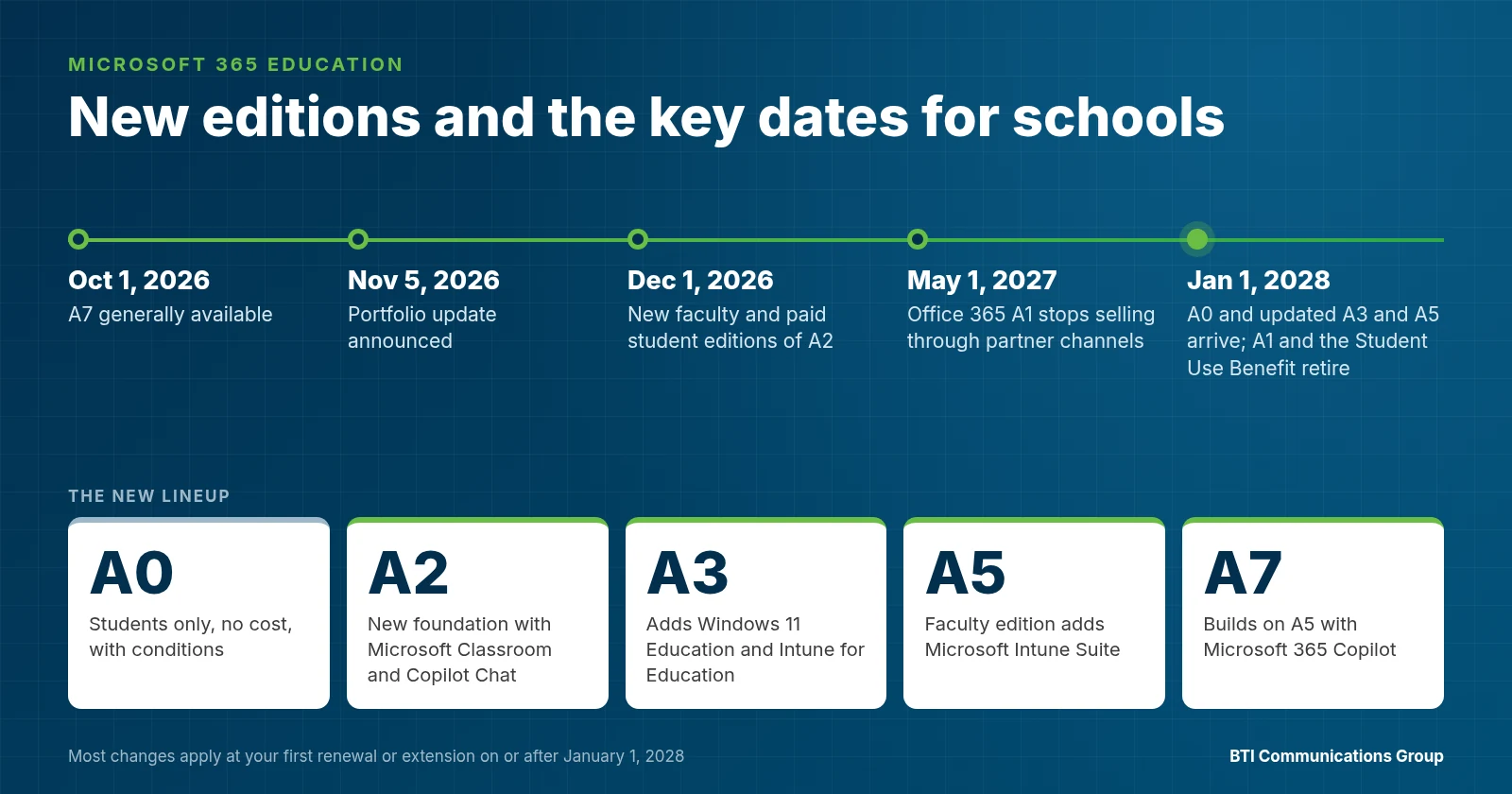
- October 1, 2026. Microsoft 365 Education A7 became generally available.
- November 5, 2026. Microsoft announced the update. Office 365 A1 stopped selling through Microsoft’s web direct channel.
- December 1, 2026. New faculty and paid student editions of A2 become available.
- May 1, 2027. Office 365 A1 stops selling through partner channels, including CSP and Volume Licensing. Online Services bought through Academic Volume Licensing move to one consistent price across Price Levels at your first renewal or extension on or after this date.
- January 1, 2028. A0 and the updated A3 and A5 become available. Office 365 A1, the Student Use Benefit, free Exchange Online for Alumni, OVS-ES and School 3 retire. The new storage model applies at your first renewal or extension on or after this date.
Existing agreements, pricing, licenses and entitlements stay in effect until the applicable renewal. Multi-year agreements run to the end of their term even if January 1, 2028 falls in the middle. Microsoft also says early renewals or early commits meant to avoid the changes are not permitted, so waiting it out with an early signature is not an option.
What is new
Five editions instead of today’s mix. The lineup becomes A0, A2, A3, A5 and A7. A0 is for students only. The others come in faculty and student editions, and A2 through A7 are offered with or without Teams. Schools can mix editions across groups and license only the users who need a given edition.
A0, a no-cost student option, with conditions. A0 includes Office desktop and web apps, Minecraft Education, Microsoft Entra ID Free and access to Learning Zone. It is available when every faculty member is licensed on A2 or higher and for students who use Windows devices for school. It does not include Exchange Online, SharePoint Online or Teams, and it adds no storage.
A2 as the new foundation. A2 adds Microsoft Classroom, Learning Accelerators, Copilot Chat, Power Platform capabilities, Entra ID P1, School Data Sync, mobile device management, standard auditing and email protection.
More security in A3 and A5 faculty suites. A3 adds Windows 11 Education and Intune for Education on top of A2, and the A3 faculty edition now includes Microsoft Defender for Office 365 Plan 1. The A5 faculty edition adds Microsoft Intune Suite. Microsoft says suite list prices do not increase.
A7 for governed AI. A7 builds on A5 with Microsoft 365 Copilot, Microsoft Agent 365 and Microsoft Entra Suite. Microsoft positions it for institutions moving from AI experiments to governed AI and agents at scale.
Microsoft Classroom. A new home for teaching and learning, included in A2 through A7. It brings Assignments, Gradebook, Classwork, Class Notebook, a Teach module for educators and a Study and Learn Agent for students. It does not replace Teams education features, and it can work alongside another collaboration tool or learning management system.
Copilot Chat in every paid edition. Paid A2, A3, A5 and A7 editions include Copilot Chat. Students 13 and older can use it once the institution enables it and sets its controls.
The quiet change: storage
Today, education tenants share a storage pool that starts with a 100 TB base. At your first renewal or extension on or after January 1, 2028, that base is removed. The pool is then built only from paid licenses: 4 GB per A2 student, 8 GB per A3 student and 12 GB per A5 or A7 student, and 50 GB, 75 GB or 150 GB per faculty license on A2, A3, or A5 and A7. A0 students add nothing.
For a district that has kept years of OneDrive and SharePoint data, this is the number to model first. Microsoft’s options if the math comes up short are a higher edition, 10 TB storage packs, cleanup, or Microsoft 365 Archive.
What it means for K-12 districts
Districts that rely on free Office 365 A1 for students feel this most. To give students free A0, every faculty member needs a paid A2 or higher license, and A0 students lose email, SharePoint and Teams. Students who need those services will need a paid student edition. The practical questions are which grades need email and Teams, which students use Windows devices, and whether Microsoft Classroom will sit alongside or replace current Teams classes. Device management matters too, since A2 adds mobile device management and A3 adds Intune for Education.
What it means for colleges and universities
Higher ed carries two extra items. Alumni email: free Exchange Online for Alumni retires, and a paid alumni offer becomes available through CSP and EES. Faculty security: A3 and A5 faculty editions gain Defender for Office 365 Plan 1 and Intune Suite, which may let you retire overlapping tools. Research and administrative teams evaluating Copilot and agents should look at A7 and the governance it brings, starting with permissions cleanup before AI can read shared data.
A renewal checklist
- Find your renewal or extension date, and check whether it falls on or after May 1, 2027 or January 1, 2028.
- Export license assignments for faculty, staff, students, alumni, Office 365 A1 and the Student Use Benefit.
- Mark the users who will need a replacement license.
- Measure current pooled storage and project it under the new per license model.
- Decide who needs email, SharePoint and Teams, and who can use A0.
- Confirm every faculty member will be on A2 or higher if you plan to use A0 for students.
- Pick where AI belongs, from Copilot Chat in A2 to full Copilot in A7, with student age and access controls.
- Decide the future of alumni email.
- Review security and device management you get with A3 or A5 against tools you pay for separately.
- Budget for the transition before the quote arrives.
Questions to ask your Microsoft provider
- What is our exact renewal date, and which changes apply to us at that date?
- How many of our users are on Office 365 A1 or the Student Use Benefit today, and what will each group move to?
- What will our storage pool be under the new model, and are we over it?
- Which edition mix fits our faculty, staff and students, and what does each choice include?
- How will you move users and data without disrupting classes?
- How will you configure and monitor the new Defender, Intune and Entra features so they protect us instead of sitting idle?
- Who answers when something breaks, and what response times are in writing?
- Can you work with our internal IT team instead of replacing it?
How BTI helps
BTI sells and manages Microsoft 365 licensing through Microsoft’s Cloud Solution Provider (CSP) program and supports schools from offices in Santa Fe Springs, Downers Grove and Phoenix. We map every user to the right edition, model storage before renewal, move users off Office 365 A1 and the Student Use Benefit, and secure the tenant with a 24/7 NOC/SOC. School IT teams can choose fully managed, co-managed or month-to-month managed IT, and every BTI support agreement includes SLAs with 4-hour onsite emergency response. BTI has been in business for over 40 years.
See Microsoft 365 Education licensing and transition help and BTI’s Microsoft services.
Know your renewal date?
Sources
- Microsoft Education Blog, “Future-ready education: Evolving Microsoft 365 Education”, November 5, 2026: https://www.microsoft.com/en-us/education/blog/2026/11/future-ready-education-evolving-microsoft-365-education/
- Microsoft Learn, “Microsoft 365 Education portfolio evolution”: https://learn.microsoft.com/en-us/training/educator-center/instructor-materials/microsoft-365-education-portfolio
- Microsoft Learn, “Microsoft 365 Education frequently asked questions”: https://learn.microsoft.com/en-us/training/educator-center/instructor-materials/microsoft-365-education-frequently-asked-questions
Related BTI reading: School cybersecurity, AI for schools and colleges, school IT services.