
Alarm.com Multi-Location Management and Enterprise Dashboard
BTI installs and supports Alarm.com for Business for commercial clients only. We do not serve homes or residential customers.
When a business runs three, thirty or three hundred locations, security gets hard to manage one site at a time. The Alarm.com for Business Enterprise Dashboard puts every location's alarms, doors, cameras, temperatures and reports in one view. BTI designs a standard system for your sites, installs it location by location and supports it, starting in Los Angeles, Chicago and Phoenix.
Book a free consultationRequest a quoteAsk About 3.99% Financing For qualified buyers, subject to credit approval.
Call: Los Angeles 562-298-5000 | Chicago 312-432-5300 | Phoenix 602-733-6807
- Over 40 years in business
- Alarm.com dealer, certified in every Alarm.com product area we sell
- Licensed Alarm Company Operator
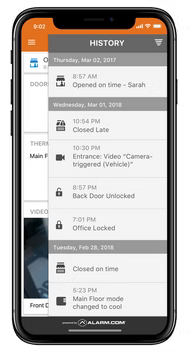
What the Alarm.com Enterprise Dashboard does
According to Alarm.com, multi-location management includes:
- Your organization, mirrored: arrange locations in three tiers, Enterprise, Subgroup (such as a region) and Location, so permissions and settings follow your org chart.
- Global user management: manage user codes and access permissions across groups in bulk, for consistency at every site.
- Real-time control: see and control arming state, door locks, schedules and HVAC set points for all locations.
- Multi-location video: view live and recorded video across locations, export incident footage remotely and check video health and retention.
- Investigations: query and filter up to one year of activity history across all locations or selected groups.
- Scheduled reports: automatic reports to managers on open and close times, access history or walk-in freezer temperatures.
Business reports and activity alerts
Alarm.com Business Reports add operational insight on top of security:
- Activity alerts: know when a location opens late or closes early and who was responsible, when power goes out and comes back, when a door is left open, or when a freezer is out of range.
- Operational reporting: reports on peak traffic times, alarms, system issues and property activity, emailed on a schedule or pulled up in the app.
- Unusual activity detection: Alarm.com describes a machine learning feature that learns day to day operations and can alert you to unexpected activity.
Video: Get More Insights About Your Business with Custom Activity Reports from Alarm.com (Alarm.com)
How BTI delivers multi-location Alarm.com
Quote and design. BTI builds a standard design for your location types, such as a store, an office or a warehouse, so every site gets the same doors, cameras, sensors and rules. The quote shows the standard package, site by site differences and your rollout schedule. Request a quote or book a free consultation to start.
Sales. BTI recommends the Enterprise Dashboard when you have several locations to manage. For portfolios that need heavier video management, BTI may pair Alarm.com with OpenEye cloud video.
Installation and rollout. We land locally, then expand nationally. BTI's teams install in Los Angeles, Chicago and Phoenix and coordinate rollouts at your other locations, then set up your enterprise tiers, user groups and reports.
Licensing. Enterprise and location features run on Alarm.com service plans provided through your dealer. BTI explains the plans each location needs when we quote.
Monitoring. Alarm signals and video events from every location are monitored by BTI staff and BTI's central stations. Add remote video monitoring for event-triggered video review; video verification helps police prioritize the call.
Service and support. BTI is one point of contact for changes, user onboarding and offboarding, report setup and service across your locations.
Who uses Alarm.com multi-location management
- Retail chains and franchise groups: consistent opening, closing and alarm schedules at every store.
- Restaurant groups: open and close reports plus walk-in cooler temperatures across locations.
- Property and facility managers: doors, cameras and alarms across a portfolio of commercial properties.
- Healthcare and dental groups: controlled access and supply room monitoring at every clinic.
- Small fleets: Alarm.com Connected Fleet vehicle tracking can run in the same account.
Build a multi-location system with every product
- Alarm.com access control for consistent door permissions
- Alarm.com commercial video for video across sites
- Alarm.com temperature monitoring for cold storage and server rooms
- Alarm.com for Business overview including intrusion detection
BTI's view: standardize first, then roll out
Multi-location security gets expensive when every site is a one-off. The rollouts that go best start with a standard:
- Pick your location types. Most businesses have two or three, such as a store, an office and a warehouse. Each gets a standard set of doors, cameras, sensors and rules.
- Name things the same way everywhere. Matching zone, door and camera names make reports readable across sites.
- Build user groups by role. Managers, staff, cleaning crews and vendors get the same permissions at every location, so onboarding and offboarding are one step.
- Schedule the reports managers need. Late openings, early closings and freezer temperatures in one email beat logging in to check every site.
Multi-location Alarm.com near you
- Los Angeles: multi-location design and rollout from Southern California. Call 562-298-5000.
- Chicago: multi-location design and rollout from Chicagoland. Call 312-432-5300.
- Phoenix: multi-location design and rollout from the Phoenix metro. Call 602-733-6807. Tucson locations are served through contractors working with BTI.
Plan your multi-location rollout
Tell us how many locations you have and where they are. A BTI security engineer will reply with next steps.
Book a free consultationRequest a quoteAsk About 3.99% Financing For qualified buyers, subject to credit approval.
Locations we serve
BTI Communications Group serves businesses and commercial properties only, from three regional offices. Multi-location Alarm.com rollouts are planned from the BTI office nearest your headquarters and supported across all three metros.
BTI Los Angeles
12155 Mora Drive, Suites 1 & 2
Santa Fe Springs, CA 90670
Call: 562-298-5000
Service area: Los Angeles County, Orange County, the Inland Empire and the rest of Southern California.
BTI Chicagoland
1441 Branding Ave, Suite 200
Downers Grove, IL 60515
Call: 312-432-5300
Service area: Chicago, Cook County, DuPage County and the rest of Chicagoland.
BTI Phoenix / Tucson
615 N 48th St, Suite 1048
Phoenix, AZ 85008
Call: 602-733-6807
Service area: Greater Phoenix, including Scottsdale, Tempe, Mesa and Chandler. Tucson projects are served through contractors working with BTI.
Frequently asked questions
What is the Alarm.com Enterprise Dashboard?
It is Alarm.com for Business's multi-location management tool. One administrator can manage users, doors, alarms, video, set points and reports across every location.
Does BTI install Alarm.com for homes?
No. BTI works only with businesses and commercial properties. We do not install Alarm.com in homes or for residential customers.
How many locations can I manage?
Alarm.com describes the Enterprise Dashboard as built for tens, hundreds or thousands of business locations, organized by enterprise, region and location.
Can I update user codes at every location at once?
Yes. Alarm.com supports bulk management of user codes and access permissions across groups of locations.
Can I see video from all my locations?
Yes. You can view live and recorded video across locations, export incident footage and check video health from one account.
What reports can I schedule?
Alarm.com can email reports such as open and close times, access history, alarms and walk-in freezer temperatures to the managers you choose.
How do I get a quote for a multi-location Alarm.com system?
Request a quote or book a free consultation. BTI designs a standard package for your location types and sends a site by site quote.
How is multi-location Alarm.com licensed?
Enterprise and location features run on Alarm.com service plans provided through your dealer. BTI explains the plans each site needs when we quote.
Can BTI support locations outside Los Angeles, Chicago and Phoenix?
BTI starts locally and coordinates rollouts at other locations. Coverage for each site is confirmed during your assessment.