
Alarm.com Commercial Video with Business Analytics
BTI installs and supports Alarm.com for Business for commercial clients only. We do not serve homes or residential customers.
Alarm.com commercial video turns business security cameras into tools for security and operations: commercial-grade cameras, the Alarm.com Commercial SVR, AI analytics and video in the same app as your alarm and doors. BTI designs, installs and supports Alarm.com commercial video for businesses across Los Angeles, Chicago and Phoenix.
Book a free consultationRequest a quoteAsk About 3.99% Financing For qualified buyers, subject to credit approval.
Call: Los Angeles 562-298-5000 | Chicago 312-432-5300 | Phoenix 602-733-6807
- Over 40 years in business
- Alarm.com dealer, certified in Alarm.com video
- Axis Gold Partner
- Licensed Alarm Company Operator
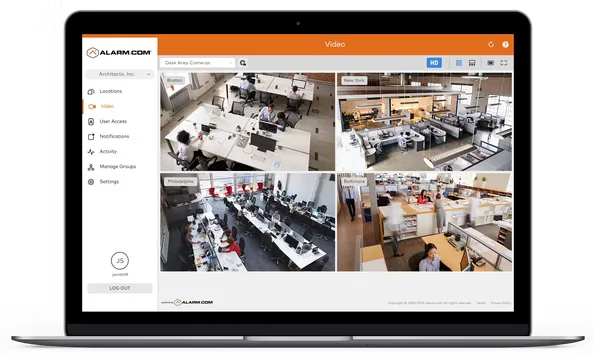
What Alarm.com commercial video includes
According to Alarm.com, the commercial video line includes:
- Commercial-grade cameras: Pro Series cameras with options such as 4MP HDR video, IR night vision and varifocal lenses. Alarm.com lists NDAA-compliant options in its commercial line.
- 24/7 recording: onboard camera recording or recording to the Commercial SVR, with a 24/7 timeline to find and export footage.
- The Commercial SVR: Alarm.com states its Commercial SVR records up to 16 cameras at up to 4MP, offers built-in PoE options and supports third-party cameras that use ONVIF or Axis VAPIX.
- AI video analytics: detect people and vehicles in the zones you choose while ignoring motion such as rain or shadows, with real-time alerts for after-hours activity.
- Perimeter Guard and AI deterrence: Alarm.com's proactive defense features, designed to deter people in protected areas after hours. BTI confirms which cameras support them.
- Business Activity Analytics: customer flow insights from your cameras to help with staffing and operations.
- Video event search: search for events instead of scrubbing through hours of footage.
- Video health monitoring: alerts if a camera goes offline, stops recording or is blocked, plus storage and retention reporting.
- Cell Connector for Video: an LTE connection for cameras where there is no network, a limited network or IT restrictions.
Keep the cameras you have
Many businesses already own cameras. Alarm.com states that cameras using ONVIF or Axis VAPIX can connect to its Commercial SVR. As an Axis Gold Partner, BTI checks your current cameras during the site assessment and tells you which can stay and which should be replaced.
How BTI delivers Alarm.com commercial video
Quote and design. BTI plans camera placement, fields of view, lighting, mounting heights, recording and retention, and network or cellular connections. We map cameras to doors, registers, docks and perimeters so the analytics have the right views. Request a quote or book a free consultation to start.
Sales. BTI recommends Alarm.com video when you want cameras, alarm and access control in one app. For larger camera counts or video management needs, BTI may recommend OpenEye, Alarm.com's commercial cloud video platform, instead or alongside. See OpenEye cloud video and OpenEye recorders.
Installation. BTI technicians install cameras, the Commercial SVR, PoE switching and cabling, then set analytics zones, alert rules and user access, and train your team on the app.
Licensing. Alarm.com video features, such as cloud clips, analytics and video health reporting, run on an Alarm.com service plan provided through your dealer. BTI explains the plan your cameras and features need when we quote.
Monitoring. Add remote video monitoring and BTI staff and BTI's central stations review event video, warn intruders through on-site speakers and call police when needed. Video verification helps police prioritize the call.
Service and support. BTI's local technicians handle camera service, lens and view adjustments, recorder health and analytics tuning after go-live.
Where Alarm.com commercial video fits
- Retail: customer flow insights, register and stockroom views, after-hours alerts.
- Restaurants and food service: back door and delivery views, opening and closing checks.
- Offices: entrances, lobbies and parking areas tied to access control events.
- Warehouses and yards: perimeter analytics and AI deterrence for docks, fences and lots.
- Multi-site businesses: view live and recorded video across locations from the Enterprise Dashboard.
See Alarm.com commercial video in action
Video: Protect Your Business with AI Deterrence (Alarm.com)
Video: Business Activity Analytics Support for V730 & VC730P (Alarm.com)
Video: How to connect video to the cloud from anywhere with the Alarm.com Cell Connector for Video (Alarm.com)
BTI's view: getting real value from business cameras
Cameras that nobody looks at only help after something goes wrong. The businesses that get the most from Alarm.com video set it up to work for them:
- Aim for faces and plates where it counts. Entrances, registers and gates need closer views than wide parking lot shots. BTI plans lenses and mounting heights for each job.
- Use analytics zones, not motion everywhere. Person and vehicle zones on fences, docks and doors cut alert noise so your team pays attention when an alert comes in.
- Watch video health. A camera that went offline last month is the most common surprise after an incident. Video health alerts catch it early.
- Decide who responds. Alerts to managers work during business hours. After hours, remote video monitoring puts trained operators on every event.
Alarm.com commercial video near you
- Los Angeles: Alarm.com commercial video design, installation and service across Los Angeles County, Orange County and the Inland Empire. Call 562-298-5000.
- Chicago: Alarm.com commercial video installation and support across Chicagoland. Call 312-432-5300.
- Phoenix: Alarm.com commercial video across the Phoenix metro. Call 602-733-6807. Tucson projects are served through contractors working with BTI.
Plan your Alarm.com commercial video system
Tell us what you want to see and how many locations you have. A BTI security engineer will reply with next steps.
Book a free consultationRequest a quoteAsk About 3.99% Financing For qualified buyers, subject to credit approval.
Back to Alarm.com for Business
Locations we serve
BTI Communications Group serves businesses and commercial properties only, from three regional offices. Alarm.com commercial video projects are designed, installed and supported by the local BTI team.
BTI Los Angeles
12155 Mora Drive, Suites 1 & 2
Santa Fe Springs, CA 90670
Call: 562-298-5000
Service area: Los Angeles County, Orange County, the Inland Empire and the rest of Southern California.
BTI Chicagoland
1441 Branding Ave, Suite 200
Downers Grove, IL 60515
Call: 312-432-5300
Service area: Chicago, Cook County, DuPage County and the rest of Chicagoland.
BTI Phoenix / Tucson
615 N 48th St, Suite 1048
Phoenix, AZ 85008
Call: 602-733-6807
Service area: Greater Phoenix, including Scottsdale, Tempe, Mesa and Chandler. Tucson projects are served through contractors working with BTI.
Frequently asked questions
What is the Alarm.com SVR?
The SVR is Alarm.com's stream video recorder. Alarm.com states its Commercial SVR records up to 16 cameras at up to 4MP and supports third-party cameras that use ONVIF or Axis VAPIX.
Does BTI install Alarm.com for homes?
No. BTI works only with businesses and commercial properties. We do not install Alarm.com cameras or any other Alarm.com product in homes or for residential customers.
What are Alarm.com video analytics?
Alarm.com's AI analytics detect people and vehicles in zones you choose and ignore motion such as rain or shadows. Business Activity Analytics adds customer flow insights for operations.
Can I keep my existing cameras?
Often, yes. Alarm.com states that cameras using ONVIF or Axis VAPIX can connect to its Commercial SVR. BTI checks your cameras during the site assessment.
What is Perimeter Guard?
Perimeter Guard is Alarm.com's proactive defense feature for compatible cameras, designed to deter intruders in zones you protect. BTI confirms which of your cameras support it.
Can Alarm.com cameras work without a network connection?
Alarm.com's Cell Connector for Video uses LTE to connect cameras where there is no network or a limited one. BTI confirms coverage at your site.
How do I get a quote for Alarm.com commercial video?
Request a quote or book a free consultation. BTI designs camera placement and recording, then sends a written quote.
How is Alarm.com video licensed?
Video features run on an Alarm.com service plan provided through your dealer. BTI explains the plan your cameras need when we quote.
Can BTI monitor my Alarm.com cameras?
Yes. With remote video monitoring, BTI staff and BTI's central stations review event video and call police when needed. Video verification helps police prioritize the call.
Should I choose Alarm.com video or OpenEye?
Alarm.com video fits businesses that want cameras, alarm and access in one app. OpenEye fits larger camera counts and video management needs. BTI is an authorized OpenEye reseller and installs both.