
Alarm.com Smarter Access Control for Commercial Buildings
BTI installs and supports Alarm.com for Business for commercial clients only. We do not serve homes or residential customers.
Alarm.com Smarter Access Control puts every commercial door, reader and credential into the same Alarm.com for Business app as your alarm and cameras. BTI designs, installs and supports it for offices, retail, warehouses, healthcare sites and commercial properties across Los Angeles, Chicago and Phoenix.
Book a free consultationRequest a quoteAsk About 3.99% Financing For qualified buyers, subject to credit approval.
Call: Los Angeles 562-298-5000 | Chicago 312-432-5300 | Phoenix 602-733-6807
- Over 40 years in business
- Alarm.com dealer, certified in Alarm.com access control
- Licensed Alarm Company Operator
Why businesses choose Alarm.com access control
Keys get copied and lost, and standalone access systems add another login and another vendor. Alarm.com's commercial access control runs on the same cloud platform as Alarm.com intrusion and video, so one app controls who gets in, when the alarm arms and what the cameras saw.
What Alarm.com Smarter Access Control does
According to Alarm.com, Smarter Access Control includes:
- Mobile credentials: employees can open doors with their smartphones instead of carrying separate badges or fobs. Cards and fobs are still available where you prefer them.
- Simple user management: add or remove users and cards in seconds from the app or website, bulk-add hundreds of users at once, or set a card to deactivate automatically on a set date.
- Remote lock control: lock, unlock and buzz doors open from anywhere, and grant or revoke remote lock permissions per user.
- Schedules, rules and alerts: keep doors unlocked during business hours, locked after hours, and get alerts on door events that matter.
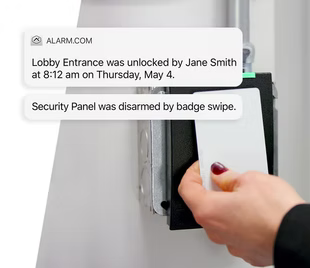
- Access and alarm working together: the first badge-in of the day can disarm the alarm, a double tap of a card can arm it on the way out, and certain doors can trigger an alarm if opened at the wrong time.
- Video at every door event: jump from an access event to the matching video with one tap, and answer a video intercom call and buzz someone in from the call screen.
How BTI delivers Alarm.com access control
Quote and design. BTI walks every door you want to control and checks door hardware, frames, power, network and building code needs before anything is ordered. The design covers readers, controllers, locks or strikes, request to exit devices and any cameras that should pair with door events. You get a written quote; request a quote or book a free consultation to start.
Sales. BTI is honest about fit. Alarm.com access control suits businesses that want doors, alarms and video in one app. For large campuses or sites already on another platform, BTI may recommend a different access control system. See access control solutions and cloud access control.
Installation. BTI technicians install readers, controllers, electrified locks and wiring, then set up users, groups, schedules and automation rules. We test every door with your team before go-live.
Licensing. Alarm.com access control features run on an Alarm.com service plan provided through your dealer. BTI explains the plan your doors and features need when we quote the project.
Monitoring. Door forced and door held open events can be routed to your team and, when tied to your alarm, to BTI staff and BTI's central stations.
Service and support. BTI's local technicians handle door hardware service, reader replacements, user training and rule changes as your business grows.
Where Alarm.com access control fits
- Offices: mobile credentials for staff, visitor intercom at the front door, after-hours lockdown.
- Retail and restaurants: opening and closing tied to the alarm, back door alerts, video of every delivery door event.
- Warehouses and light industrial: gates, dock doors and restricted rooms on schedules.
- Healthcare and medical offices: controlled access to supply, medication and records rooms.
- Multi-site businesses: manage users and permissions across locations from the Alarm.com Enterprise Dashboard.
Pair access control with video
Every door event is more useful with a picture. Add Alarm.com commercial video so each badge-in, forced door or intercom call links to a clip. For sites with larger camera counts, see OpenEye cloud video.
BTI's view: what makes an access control project go well
Most access control problems we are called to fix come from the door, not the software. A reader on a door that does not latch, a maglock with no proper release, or a gate with no power at the post will fail no matter how good the app is. That is why BTI checks hardware, frames, power and egress needs on every door before quoting. Three more lessons from our installs:
- Start with who, where and when. Write down which groups need which doors at which times. It makes setup faster and keeps permissions clean as staff change.
- Tie doors to the alarm. Letting the first badge-in disarm the system cuts false alarms from staff who forget codes.
- Plan for growth. Choose controllers with room for more doors, so adding a stockroom or a second site later is simple.
Alarm.com access control near you
- Los Angeles: Alarm.com access control design, installation and support across Los Angeles County, Orange County and the Inland Empire. Call 562-298-5000.
- Chicago: Alarm.com access control installation and service across Chicagoland. Call 312-432-5300.
- Phoenix: Alarm.com access control across the Phoenix metro. Call 602-733-6807. Tucson projects are served through contractors working with BTI.
Start your Alarm.com access control project
Tell us how many doors and locations you have. A BTI security engineer will reply with next steps.
Book a free consultationRequest a quoteAsk About 3.99% Financing For qualified buyers, subject to credit approval.
Back to Alarm.com for Business
Locations we serve
BTI Communications Group serves businesses and commercial properties only, from three regional offices. Alarm.com access control projects are designed, installed and supported by the local BTI team.
BTI Los Angeles
12155 Mora Drive, Suites 1 & 2
Santa Fe Springs, CA 90670
Call: 562-298-5000
Service area: Los Angeles County, Orange County, the Inland Empire and the rest of Southern California.
BTI Chicagoland
1441 Branding Ave, Suite 200
Downers Grove, IL 60515
Call: 312-432-5300
Service area: Chicago, Cook County, DuPage County and the rest of Chicagoland.
BTI Phoenix / Tucson
615 N 48th St, Suite 1048
Phoenix, AZ 85008
Call: 602-733-6807
Service area: Greater Phoenix, including Scottsdale, Tempe, Mesa and Chandler. Tucson projects are served through contractors working with BTI.
Frequently asked questions
What is Alarm.com Smarter Access Control?
Smarter Access Control is Alarm.com's commercial access control product. It manages doors, readers, credentials and schedules in the same Alarm.com for Business app as your alarm and video.
Does BTI install Alarm.com for homes?
No. BTI works only with businesses and commercial properties. We do not install Alarm.com access control or any other Alarm.com product in homes or for residential customers.
Can employees use their phones as credentials?
Yes. Alarm.com supports mobile credentials, so employees can open doors with a smartphone. BTI can also issue cards or fobs where you prefer them.
Can Alarm.com access control disarm my alarm?
Yes. Rules can disarm the alarm on the first badge-in of the day and arm it when an employee double taps a card on the way out.
Can I unlock a door remotely?
Yes. Authorized users can lock, unlock and buzz doors open from the Alarm.com app or website.
Do I need new door hardware?
It depends on your doors. BTI checks locks, frames, power and wiring during the site walk and includes any hardware your doors need in the quote.
How do I get a quote for Alarm.com access control?
Request a quote or book a free consultation. BTI walks your doors, designs the system and sends a written quote.
How is Alarm.com access control licensed?
Features run on an Alarm.com service plan provided through your dealer. BTI explains the plan your doors need when we quote.
Who services and supports my access control system?
BTI's local technicians in Los Angeles, Chicago and Phoenix handle service, hardware repairs, user training and rule changes.
What happens when an employee leaves or loses a badge?
Remove the user or card in the Alarm.com app or website and access ends at every door on the system. Changes take seconds. For temporary staff and contractors, you can set a card to deactivate on a set date.