Traditional keys can create serious security and management challenges for businesses. Keys can be lost, copied, shared, or forgotten. When an employee leaves or a vendor no longer needs access, a business may need to rekey doors, issue new keys, and manually track who has access to each area.
A commercial keyless entry system helps solve these problems by replacing traditional keys with electronic access control.
In this BTI Communications Group guide, we will explain what commercial keyless entry systems are, how they work, the main types available, what components they require, how much they can cost, and how to choose the right system for your business.
Quick Answer: What Is a Commercial Keyless Entry System?
A commercial keyless entry system is an electronic access control solution that allows businesses to secure doors without relying on traditional metal keys. Instead of unlocking a door with a physical key, authorized users enter with a PIN, card, fob, smartphone, biometric scan, or other digital credential.
Commercial keyless entry systems are different from basic residential smart locks because they are designed for business environments. They can support multiple users, multiple doors, access schedules, audit trails, remote management, role-based permissions, and integrations with security cameras, alarms, visitor systems, and intercoms.
For example, a business can give employees access only during work hours, restrict server room access to IT staff, provide temporary access to a vendor, or revoke a former employee’s credential without changing the locks.
Commercial vs. Residential Keyless Entry Systems
Residential keyless locks are usually designed for homes, apartments, or small private spaces. They often focus on convenience, such as unlocking a front door with a keypad or smartphone app.
Commercial keyless entry systems are designed for businesses that need more control, visibility, and scalability. A business may need to manage dozens or hundreds of users, secure multiple doors, control access by role or schedule, review access logs, integrate with other security systems, and support future growth.
A residential smart lock may be enough for a home office or a low-risk storage closet. However, most businesses need a commercial-grade access control system when they have employees, visitors, vendors, restricted areas, compliance requirements, or multiple entry points.
Key Differences
| Feature | Residential Keyless Lock | Commercial Keyless Entry System |
|---|---|---|
| Typical Use | Homes, apartments, small private spaces | Offices, warehouses, schools, healthcare facilities, retail stores, and industrial sites |
| Number of Users | Usually limited | Built for many users and departments |
| Access Control | Basic codes or app access | Role-based, schedule-based, and location-based access |
| Audit Trails | Limited or unavailable | Logs who entered, when, and where |
| Integrations | Usually limited | Can integrate with cameras, alarms, intercoms, and visitor management |
| Scalability | Best for one or a few doors | Can scale across many doors and locations |
| Administration | Basic owner controls | Centralized business management software |
How Do Commercial Keyless Entry Systems Work?
Commercial keyless entry systems use electronic credentials and access control hardware to determine whether a person should be allowed through a door.
Here is the basic process:
- A user presents a credential, such as a key card, fob, PIN code, smartphone, or biometric scan.
- The reader captures that credential and sends it to a door controller or access control system.
- The system checks whether the credential is valid.
- The system confirms whether the user can access that door at that time.
- If access is approved, the system unlocks the door electronically.
- The event may be recorded in an audit log with the user, time, door location, and access result.
This process usually happens in seconds. To the user, it may feel as simple as tapping a fob or entering a PIN. Behind the scenes, the system is verifying identity, permissions, schedules, and door status.
Key Components of Commercial Keyless Entry Systems
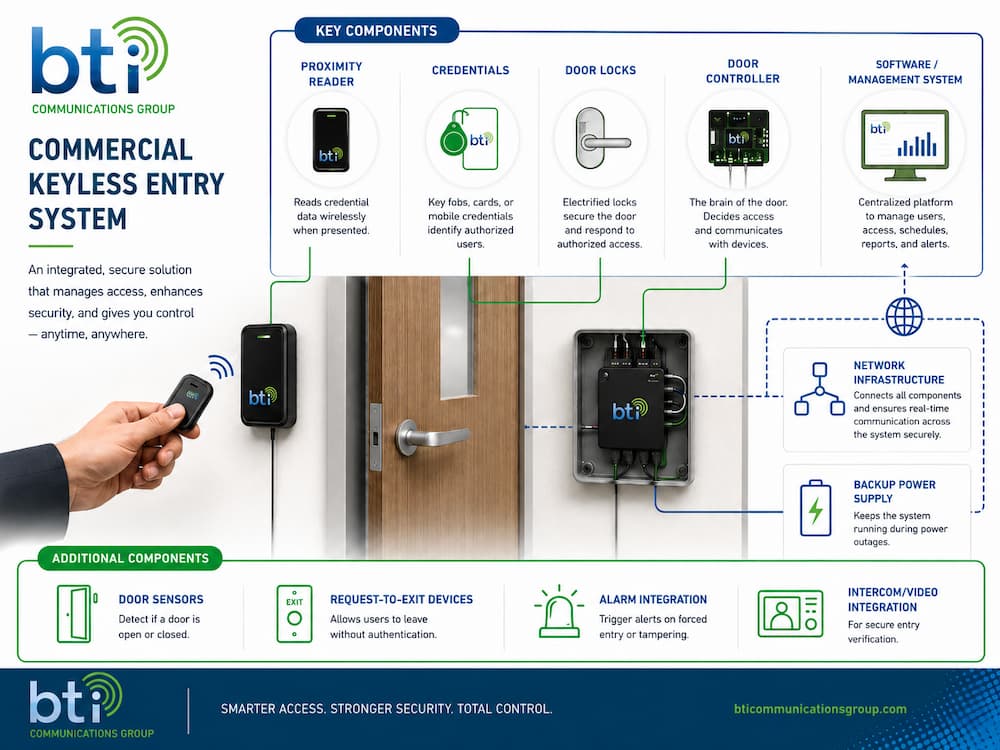
A commercial keyless entry system is more than a lock on a door. Most systems include several pieces of hardware and software that work together to authenticate users, unlock doors, monitor activity, and manage access permissions.
Proximity Reader
A proximity reader is the device installed near the door that reads a user’s credential. Depending on the system, the reader may accept key cards, fobs, mobile credentials, PIN codes, or biometric data.
Readers can be installed at exterior entrances, interior doors, restricted rooms, gates, elevators, or other controlled access points.
Credentials
Credentials are what users present to gain access. Common credential types include:
- PIN codes
- Key cards
- Key fobs
- Mobile credentials
- Biometric identifiers
- Temporary visitor credentials
The right credential type depends on the business, security level, user volume, and convenience requirements.
Door Locks
Commercial keyless entry systems often use electronic locks, electric strikes, magnetic locks, or electrified locksets. These locks receive a signal from the access control system and unlock when access is approved.
The right lock depends on the door type, frame, security requirements, fire, and life-safety rules, and whether the door needs to fail safe or fail secure during a power outage.
Door Controller
The door controller is the device that makes access decisions or communicates with the access control platform. It receives information from the reader, checks permissions, and sends the unlock command to the door hardware.
Some controllers manage one door, while others can support multiple doors. In larger systems, controllers may connect to a central access control platform or cloud-based dashboard.
Software or Management System
The management system is where administrators add users, assign permissions, create access schedules, revoke credentials, review audit logs, and manage doors.
Modern systems may offer web-based or cloud-based dashboards, allowing administrators to manage access remotely. This is especially useful for businesses with multiple locations, rotating staff, vendors, or hybrid workforces.
Network Infrastructure
Many commercial keyless entry systems rely on network connectivity to communicate with controllers, cloud platforms, video systems, or management software.
Reliable network infrastructure is important because access control is part of the building’s security foundation. Businesses may need proper cabling, switches, power, firewall configuration, VLAN planning, and secure remote access depending on the system design.
Backup Power Supply
Backup power helps keep access control systems operational during outages. Depending on the system, this may include battery backups, power supplies, or integration with a building’s backup power infrastructure.
Backup power planning is important for both security and safety. Businesses should understand which doors need to remain locked, which doors need to unlock for safe egress, and how the system behaves during a power failure.
Door Position Sensors
Door position sensors detect whether a door is open or closed. They can help identify doors that are propped open, forced open, or left unsecured after use.
Request-to-Exit Devices
Request-to-exit devices allow people to leave a secured area without presenting a credential. These may include motion sensors, push buttons, exit bars, or other egress devices.
Proper egress design is critical in commercial environments because people must be able to exit safely during normal use and emergencies.
Alarm Integration
Keyless entry systems can integrate with alarm systems to help detect unauthorized entry, forced doors, tampering, or after-hours access. When connected properly, alarms and access control can provide a more complete view of security events.
Intercom and Video Integration
Intercom and video integration allow businesses to verify visitors before granting access. This is especially useful for offices, schools, warehouses, multifamily properties, and facilities with deliveries or guest traffic.
Visitor Management Integration
Some businesses connect keyless entry systems with visitor management platforms. This can help issue temporary access, track guests, manage appointments, and improve front-desk workflows.
Commercial Keyless Entry System Types
Different types of keyless entry systems fit different business needs. A small office may need a simple keypad or fob system, while a multi-location business may need cloud-based access control with mobile credentials and centralized management.
Commercial Keyless Entry System Comparison Table
| System Type | Best For | Advantages | Limitations |
|---|---|---|---|
| Keypad or PIN-based systems | Small offices, storage rooms, low-risk interior doors | Simple to use, no cards or fobs required, affordable entry point | Shared codes reduce accountability, codes can be forgotten or shared |
| Card and key fob systems | Offices, warehouses, schools, multi-user facilities | Easy to issue and revoke, familiar to employees, good for access tracking | Cards and fobs can be lost, shared, or stolen |
| Mobile credential systems | Modern offices, multi-site businesses, flexible workplaces | Convenient, easy to revoke, reduces plastic badge use, supports remote administration | Requires smartphone adoption and compatible access control hardware |
| Biometric systems | High-security rooms, labs, data centers, restricted areas | Strong identity verification, difficult to share credentials | Higher cost, privacy considerations, may require backup access methods |
| Wireless or cloud-based systems | Multi-location businesses, organizations with remote administration needs | Centralized management, scalable, easier updates, remote user control | Requires reliable network design and subscription planning |
| Multi-factor or hybrid systems | High-risk areas, compliance-sensitive facilities | Stronger security by combining multiple authentication methods | More complex and may cost more to install and manage |
Cloud-Based vs. On-Premise Keyless Entry Systems
One of the most important decisions businesses need to make is whether to choose a cloud-based or on-premise access control system.
Cloud-Based Systems
Cloud-based systems allow administrators to manage users, doors, permissions, schedules, and reports through a web-based platform. This can make it easier to manage access remotely and across multiple locations.
Cloud-based systems are often a good fit for:
- Multi-location businesses
- Hybrid workplaces
- Businesses without dedicated on-site IT staff
- Organizations that need remote access management
- Companies that frequently add or remove users
- Businesses that want centralized reporting
The main considerations are subscription costs, internet connectivity, vendor reliability, cybersecurity, and integration requirements.
On-Premise Systems
On-premise systems are hosted locally, often on a server or appliance controlled by the organization. Some businesses prefer this model because they want more direct control over infrastructure, data, and internal security policies.
On-premise systems may be a fit for:
- Organizations with strict internal IT requirements
- Facilities with specialized compliance needs
- Businesses with dedicated IT or security teams
- Sites where cloud connectivity is limited or restricted
The main considerations are maintenance, updates, local server management, backups, and long-term support.
Benefits of Keyless Entry Systems for Businesses
Commercial keyless entry systems can improve security, reduce administrative work, and make access easier to manage across the organization.
Stronger Security
Keyless systems reduce the risks associated with lost, copied, or unreturned physical keys. Access can be granted, changed, or revoked digitally, which is especially useful when employees leave, vendors change, or temporary access is needed.
Instead of wondering who has a copy of a key, administrators can manage access from the system and remove credentials when they are no longer needed.
Lower Rekeying and Key-Management Costs
With traditional locks, a lost key may require rekeying doors and issuing new keys. With keyless entry, an administrator can deactivate a credential instead, helping reduce locksmith costs and administrative time.
This can be especially valuable for businesses with high employee turnover, multiple locations, shared spaces, or frequent vendor access.
Audit Trails and Accountability
Many commercial keyless entry systems log access events with a timestamp, user identity, door location, and access result. This helps businesses investigate incidents, confirm after-hours access, support compliance needs, and understand building usage.
Audit logs can also help answer important questions, such as:
- Who entered the building after hours?
- Which employees accessed a restricted area?
- Was a door forced open or left open?
- Did a vendor enter during the approved access window?
Better Access Control by Role or Schedule
Businesses can limit access by department, role, shift, location, or time of day. For example, warehouse staff might access loading areas during assigned shifts, while only IT staff can enter server rooms.
This helps businesses follow the principle of least privilege: users should only have access to the areas they need.
Improved Convenience for Employees
Employees do not need to carry as many physical keys, and mobile credentials can let them use their phones to enter. Mobile credentials can also reduce reliance on plastic badges, badge printers, ink, and physical badge storage.
For employees, the experience can be faster and easier. For administrators, credential management becomes more centralized.
Integration With Alarms, Cameras, and Visitor Systems
Keyless entry works best when connected to other security systems. Some platforms can integrate access control with alarms, video surveillance, visitor logs, and unified dashboards.
Integrated security systems give security teams a clearer picture of what is happening. For example, if a door is forced open, the system may trigger an alert and help security staff review camera footage from that location.
Scalability as the Business Grows
A keyless system can scale across more doors, users, departments, and locations without constantly cutting new keys. Cloud-based access control is especially useful for businesses managing multiple offices or sites from one system.
Scalability is important because access needs often change as businesses grow, move, hire, restructure, or add new facilities.
Faster Emergency Response
In schools, offices, warehouses, and other facilities, administrators may be able to lock down exterior doors or control access centrally during an emergency. This can be much faster than manually checking individual doors.
Emergency response planning should always consider life safety, safe egress, local codes, and coordination with the organization’s broader security procedures.
How to Choose the Right Commercial Keyless Entry System
The best keyless entry system depends on your building, users, security requirements, budget, and long-term plans. Before choosing a system, businesses should consider the following factors.
Number of Doors
A single-door solution is different from a multi-door access control system. Count exterior entrances, employee doors, restricted rooms, gates, elevators, storage areas, server rooms, and any other access points that may need control.
Number of Users
Consider how many employees, vendors, tenants, visitors, contractors, or temporary workers need access. A system should be easy to manage as users are added, removed, or reassigned.
Credential Type
Decide whether users should enter with PINs, cards, fobs, mobile credentials, biometrics, or a combination of methods. The right credential type depends on convenience, security level, user behavior, and cost.
Remote Management
If administrators need to manage access from different locations, a cloud-based system may be a strong option. Remote management can be especially useful for multi-site businesses, property managers, and organizations with hybrid workforces.
Integration Requirements
Consider whether the system needs to connect with alarms, cameras, intercoms, visitor management, identity systems, or building management platforms. Integration planning is easier before installation than after the system is already deployed.
Audit and Compliance Needs
Some businesses need detailed access logs for investigations, insurance, compliance, or internal policy enforcement. If audit trails matter, choose a system with clear reporting and user-level access history.
Network and Power Requirements
Access control systems may require cabling, switches, network segmentation, power supplies, backup batteries, and secure internet connectivity. Network infrastructure should be part of the planning process, not an afterthought.
Scalability
Choose a system that can grow with your business. A system that works for one door today should not become a limitation when you add more doors, users, or locations later.
Installation and Support
Commercial access control involves hardware, software, doors, locks, power, networking, and safety requirements. Choose a provider that understands both physical security and the technology infrastructure behind it.
Commercial Keyless Entry Installation Requirements
Installing a commercial keyless entry system usually requires more than replacing a lock. A proper installation may involve access control hardware, door hardware, cabling, power, networking, software setup, user configuration, and system testing.
Common installation requirements include:
- Door assessment
- Reader placement
- Electrified locks or electric strikes
- Door controllers
- Low-voltage cabling
- Power supplies
- Backup batteries
- Network connectivity
- Software configuration
- User and credential setup
- Testing and training
- Integration with cameras, alarms, or intercoms
Businesses should also consider door type, frame condition, fire and life-safety requirements, ADA accessibility, emergency egress, and local code requirements.
A well-designed system should balance security with safe and practical building access.
How Much Does a Commercial Keyless Entry System Cost?
The cost of a commercial keyless entry system depends on the size of the project, the hardware selected, the number of doors, the type of credentials, the condition of the existing doors, and the complexity of the installation.
A single-door keypad system is usually much simpler than a multi-door, cloud-managed access control system with mobile credentials, video intercoms, alarm integration, and centralized reporting.
| Cost Factor | Why It Matters |
|---|---|
| Number of doors | More doors require more readers, locks, controllers, cabling, and labor. |
| Door condition | Existing doors and frames may need hardware modifications. |
| Credential type | Cards, fobs, mobile credentials, PINs, and biometrics have different costs. |
| Lock hardware | Electric strikes, magnetic locks, and electrified locksets vary by application. |
| Software licensing | Cloud-based systems may include recurring licensing or subscription fees. |
| Network requirements | Cabling, switches, connectivity, and security configuration can affect cost. |
| Integrations | Cameras, alarms, intercoms, and visitor systems add complexity. |
| Backup power | Battery backups and power supplies should be planned into the system. |
| Support and maintenance | Ongoing service, monitoring, and administration may affect long-term cost. |
The best way to estimate cost is to assess the doors, security goals, user needs, network environment, and integration requirements.
Best Commercial Keyless Entry Systems by Business Type
Different industries use keyless entry systems in different ways. The best system for a small office may not be for a warehouse, school, healthcare facility, or multifamily property.
Offices
Offices often benefit from card, fob, or mobile credential systems. These systems can help manage employee access, conference rooms, IT closets, executive areas, and after-hours entry.
Cloud-based systems can be especially useful for hybrid workplaces and businesses with multiple offices.
Warehouses and Distribution Centers
Warehouses may need to secure employee entrances, loading areas, inventory rooms, equipment cages, and restricted zones. Fob or badge systems with audit trails can help track access and limit entry by role or shift.
Integration with cameras and alarms can provide stronger visibility into after-hours activity and sensitive areas.
Schools and Education Facilities
Schools may need centralized access control, visitor verification, lockdown support, and video integration. Keyless entry can help control exterior doors, administrative areas, staff entrances, equipment rooms, and restricted spaces.
Safety planning should include emergency procedures, safe egress, and coordination with the school’s broader security plan.
Healthcare Facilities
Healthcare environments often require restricted access to medication rooms, records areas, labs, staff-only spaces, and equipment storage. Role-based access and audit logs can help support security and accountability.
Retail Stores
Retail businesses may use keyless entry for employee entrances, stockrooms, cash offices, manager areas, and back-of-house spaces. Keypad, fob, or card systems can reduce key-management problems across shifts.
Gyms and Fitness Centers
Gyms may use keyless entry for member access, 24/7 entry, staff areas, offices, and equipment rooms. Mobile credentials or member access systems can help support flexible hours and automated entry.
Multifamily Properties
Multifamily properties may use keyless entry for building entrances, amenity spaces, parking areas, package rooms, maintenance rooms, and tenant access. Intercom and mobile credential systems can improve convenience and visitor management.
Industrial Facilities
Industrial sites may need stronger access control for production areas, equipment rooms, hazardous zones, research areas, and critical infrastructure. Multi-factor authentication and integrated surveillance may be appropriate for higher-risk areas.
Common Mistakes to Avoid When Choosing a Commercial Keyless Entry System
Choosing the wrong system can create security gaps, unnecessary costs, or operational headaches. Avoid these common mistakes:
- Choosing a Residential Smart Lock for a Commercial Door: Residential smart locks are not designed for the same usage, durability, management, or security requirements as commercial access control systems.
- Relying on Shared PIN Codes: Shared codes make it difficult to know who entered a door. Whenever possible, businesses should use unique credentials for each user.
- Forgetting Backup Power: Power outages can affect access control systems. Businesses should understand how doors behave during an outage and plan backup power where needed.
- Ignoring Fire, Life-Safety, and Egress Requirements: Security should never prevent safe exit. Commercial systems must be planned with proper egress and applicable code requirements in mind.
- Buying a System That Cannot Scale: A system that works for one door today may not support more doors, more users, or multiple locations later. Scalability should be part of the initial decision.
- Choosing Hardware Without Considering Software: The reader and lock are only part of the system. Businesses should also evaluate the management software, reporting features, user administration, integrations, and support model.
- Failing to Integrate Access Control with Cameras or Alarms: Standalone access control can be useful, but access control and cctv integration provide better visibility. When access events are connected with video and alarms, security teams can investigate faster.
- Not Planning for Employee Turnover, Vendors, and Visitors: Access needs change constantly. A strong system should make it easy to add temporary access, remove former employees, and manage different user groups.
When Should a Business Upgrade from Traditional Locks?
A business should consider upgrading from traditional locks when key management becomes difficult, risky, or expensive.
Signs it may be time to upgrade include:
- Employees have lost keys
- Former employees may still have access
- Vendors or contractors need temporary access
- Doors need to be rekeyed often
- There is no record of who entered the building
- Multiple locations need centralized access management
- Sensitive rooms need tighter security
- The business wants to integrate access with cameras or alarms
- Managers need to control access by schedule or role
- The organization is growing and needs a scalable system
Traditional locks can still be useful in some situations, but businesses with many users, multiple doors, restricted areas, or compliance needs often benefit from a keyless access control system.
Commercial Keyless Entry System Installation and Support From BTI
Choosing the right commercial keyless entry system is not just about selecting a lock or reader. It requires understanding your doors, users, security risks, network environment, software requirements, and long-term growth plans.
BTI helps businesses design, install, and support commercial keyless entry and access control solutions that fit their facilities and operational needs. Whether you need a single-door solution, a multi-door access control system, mobile credentials, video intercom integration, or support across multiple locations, our team can help you evaluate your options and plan the right approach.
A properly designed system can help your business improve security, reduce key-management problems, support employee convenience, and create a more scalable access control strategy.
Ready to Plan Your Commercial Keyless Entry System?
BTI can help assess your current doors, access needs, network infrastructure, and security goals. Contact BTI to schedule a commercial keyless entry consultation and learn which access control solution is the right fit for your business.
Schedule a ConsultationFAQs About Commercial Keyless Entry Systems
Are commercial keyless entry systems secure?
Yes, commercial keyless entry systems can be very secure when they are properly designed, installed, and managed. They can reduce the risks of lost keys, unauthorized key copies, and former employees retaining access.
What happens to a keyless entry system during a power outage?
It depends on the system design, lock type, and backup power setup. Some doors may remain locked, some may unlock for safety, and some may continue operating with battery backup.
Can I use my existing doors with a keyless entry system?
In many cases, yes. However, existing doors, frames, locks, and wiring need to be evaluated. Some doors may require new hardware, electrified locks, cabling, or modifications to support access control.
What is the difference between keyless entry and access control?
Keyless entry usually means unlocking a door without a traditional key. Access control is the broader system that manages who can enter, when they can enter, which doors they can use, and how access events are tracked. Commercial keyless entry is often part of a larger access control system.
Can keyless entry systems integrate with security cameras?
Yes. Many commercial access control systems can integrate with video surveillance platforms. This allows businesses to connect access events with camera footage, making it easier to investigate forced entry, after-hours access, or suspicious activity.
What is the difference between keyless entry and access control?
Keyless entry usually means unlocking a door without a traditional key. Access control is the broader system that manages who can enter, when they can enter, which doors they can use, and how access events are tracked. Commercial keyless entry is often part of a larger access control system.
Can keyless entry systems support temporary access for vendors or visitors?
Yes. Many systems allow administrators to create temporary access for vendors, contractors, visitors, or short-term staff. Access can often be limited by date, time, door, or location.
How do I know if my business needs a commercial-grade system instead of a smart lock?
Your business likely needs a commercial-grade system if you have multiple users, multiple doors, restricted areas, employee turnover, vendor access, audit requirements, compliance concerns, or the need to integrate with cameras, alarms, or visitor management.